What Counts as AI‑Generated?
Posted by bsstahl on 2026-03-28 and Filed Under: tools
I still have the first camera I ever used - a 126 box camera, similar to a Hawekeye II, that was basically a toy even in its own era. I shot with black‑and‑white film because that's what a kid could afford, and it produced the kind of photos you'd expect from a plastic lens and a shutter that felt like it was powered by hope. One of those photos captured Thurman Munson, the Yankees catcher who would later die in a plane crash, making him something of a larger-than-life figure in my experience. It's not a great photo. It's grainy, off‑center, and full of the accidental foreground clutter you get when you're small, excited, and holding a camera that doesn't care about your artistic intent.
Recently, I ended up with three versions of that same moment:
- The original - a scan of the actual frame I shot as a kid.
- A cleaned‑up version - run through an AI tool that removed some shadows, centered Munson, and erased the stray arms of the people next to me.
- A colorized version - also AI‑assisted, adding color to a scene that never existed in color on film.
All three images are real in the sense that they correspond to something that actually happened, and all three are altered in the sense that every photograph is shaped by the tools available at the time. When I show any version of these images, I could be asked, Is it "AI‑generated"?

Unfortunately, that question really can't be answered without a lot more context. All 3 images used AI as part of the pipeline in some form or another, because depending on how you define AI, even the act of scanning the original likely used a model. The question we really need to answer is: what do we mean when we say something is "AI‑generated"?
The cleaned‑up version of this photo didn't invent anything. It didn't fabricate Munson's face or change the moment. It just did what darkroom techniques, Photoshop, and restoration tools have always done. The colorized version added something new, but colorization has existed for more than a century. The only difference is that a machine did the brushwork instead of a human. What about the original? It's still the moment I captured as a kid with a box camera. The digital version may have passed through modern software on its way to the screen, but the instant in time remains intact.
Even "true" photos can mislead, with or without AI
This is where things get tricky. Any still or moving image can create false impressions with the viewer. Strange lighting, unusual shadows, a frozen instant in time that doesn't really capture the essence of the situation. All of these things happen, and we've experienced them. How many times have you taken a photo of someone who was happy, but looked sad or angry in the shot? Was the dress blue or gold?
In my three images above, the event happened nearly entirely as presented in those photos. Despite that, any of these versions can still create false impressions in the mind of the viewer.
For example:
- It is possible that Munson is talking to someone, or perhaps yelling at them in a way not captured by this frame.
- When I took the picture, there may have been one or more other people just outside the frame, changing the context.
- The cleaned‑up version might imply the scene was less crowded than it really was, because the tool removed the arms of the people next to me.
- The colorized version might imply the grass at Yankee Stadium looked a certain way that day, when the original didn't capture that detail.
- The colorization might suggest Munson wore an undershirt of a particular shade, a detail the model had to invent.
None of these facts are necessarily germane to the image, but they absolutely can alter its interpretation. Still images can present scenes in a framing that doesn't completely do it justice, while AI can introduce confident, plausible details that were never in evidence, whether done maliciously or not.
This is why labeling matters. Not because AI involvement is inherently bad, but because, in most cases, viewers deserve to know which parts of an image are grounded in reality and which parts were reconstructed, inferred, or imagined. However, defining those rules is an area where a poor definition could let some people get away with anything while the rest of us end up having to tag everything as AI generated, turning the label into just more noise.
This isn't even touching the copyright issues
Everything above is about truth: what happened, what didn't, and what an image implies, but there's a whole separate dimension we haven't entered: copyright.
Questions like:
- What training data was used to create the model?
- Who owns the derivative works?
- When does enhancement become transformation?
- What rights do I retain over my own childhood photo once an AI model has touched it?
These aren't footnotes. They're large, unresolved questions that deserve their own analysis and probably their own regulatory framework. Mixing them into the "AI‑generated vs. not" debate only makes everything muddier. So for this post, I'm deliberately setting copyright aside; not because it's unimportant, but because it's too important to treat as a parenthetical.
The Hard Part Is Defining What Matters
The reasons why blanket rules about "AI‑generated content" fall apart are complicated. The line between "generated," "assisted," "enhanced," and "restored" isn't a line at all, it's a gradient. That doesn't mean we shouldn't regulate AI‑involved media. It means we need to regulate AI with language and intent that actually matches reality, and solves the real problems.
There are cases where labeling is essential, but most of it is context specific. If I am posting a picture of a conference talk I gave, I wouldn't feel right adding fake participants in the crowd, but I'd often be fine with editing someone out who asked me to, depending on the reason for doing so. I might not feel the same way if the photograph was being published as part of a story in the news. However, there are some things that should probably always be disclosed:
- Images of things that never happened should be labeled as such.
- Images containing people that don't exist must be disclosed.
- Images where people or evidence is added absolutely require clear disclosure, even if they are believed to be 'real'.
- AI‑assisted reconstructions, such as those built from text descriptions after the fact, should be labeled in way that allows viewers understand what's real and what's assumed.
Those distinctions matter because they speak to truth, provenance, and the potential for harm, and they remain just as important whether AI is part of the process or not.
But my three images of Thurman Munson? They're all the same moment, they differ only in the tools used to reveal it. In most contexts, there is no meaningful change made by these manipulations.
There are already existing sets of rules we can lean on here. The National Press Photographers Association has a Code of Ethics for visual journalists that includes the following:
Editing should maintain the integrity of the photographic image's content and context. Do not manipulate images or add or alter sound in any way that can mislead viewers or misrepresent subjects.
I would ask you, "Does my manipulation of this image mislead viewers or misrepresent subjects?"
This Code of Ethics also includes composition and subject matter rules such as:
- Resist being manipulated by staged photo opportunities
- Be complete and provide context when photographing or recording subjects
- While photographing subjects, do not intentionally contribute to, alter, or seek to alter or influence events
- Do not pay sources or subjects or reward them materially for information or participation
- Do not accept gifts, favors, or compensation from those who might seek to influence coverage
All of which suggests that the editing of images, the part that can be done using AI, is just a small part of the harm that can be done through visual means, albeit one that scales better than most.
Here's the part we can't ignore
AI, in some form, is nearly always involved now. Not the headline‑grabbing generative models that synthesize faces or fabricate events, but the quiet, invisible systems inside scanners, cameras, phones, and photo apps, the ones nobody notices because they don't feel like AI. Processes like sharpening, noise reduction, auto‑contrast, white‑balance correction, lens‑distortion fixes and de‑mosaicing filters are all part of many of the image capture mechanisms we use every day. Other domains have similar tools used for autocorrect, predictive-text, grammar correction, spellcheck, voice-to-text, spam filtering and recommendations. These are all machine‑learning (ML) systems doing work behind the scenes.
So the question can't be "Was AI used?" The questions must be more akin to "What kind of AI was used, how was it used, and to what effect?". These questions need to be answered in the full context of the situation, because the truth of this photo is simple, AI didn't create it, it actually happened. The tools just helped me see it more clearly, but they can also help someone else see something that was never there. Outside of this one childhood snapshot, it's rarely even that simple.
Knowing the difficulty in categorizing these three versions of a childhood photo as 'AI-generated' or not, it is obvious that we can't build policy around such a binary definition. We need rules that focus on intent, impact, and what claims are being made, not on whether a model was somewhere in the toolchain. We will drill into more detail on how we can craft regulations that take these items into account in future posts.
Tags: ai ethics legislation ml opinion
Introducing the Behavioral Layer
Posted by bsstahl on 2026-03-14 and Filed Under: development
Modern systems increasingly receive free‑text input, either from humans or from language models. These inputs can be ambiguous, incomplete, or phrased in ways the domain layer cannot act on directly. They are not the predictable, schema‑bound shapes that a traditional Anti‑Corruption Layer (ACL) is designed to translate. They require interpretation before any downstream component can reason about them. This is the realm of the Behavioral Layer.
What the Behavioral Layer Does
The Behavioral Layer is responsible for taking unstructured or highly variable inputs, such as those produced by a person or a language model, and producing a clean, normalized, and predictable shape that the rest of the system can trust. It is the architectural boundary where the system interprets intent before any downstream components have to reason about structure.
At a high level, the Behavioral Layer:
- Interprets what behavior the sender is attempting to invoke
- Normalizes inconsistently presented or incomplete inputs
- Detects structural and behavioral anomalies in the message
- Enriches the data with derived or inferred attributes
- Produces a stable output object that downstream components can rely on
The Behavioral Layer is defined by its responsibilities, not by any specific technology. You can implement it with deterministic rules, heuristics, or fine-tuned models. The architecture stays the same regardless of the tools you choose.
A Machine to Machine Example
To ground this in something concrete, consider a service that exposes an OpenAI‑compatible API for the purpose of intent determination and routing. This service is designed to accept natural language inside a structured request, classify the intent, and direct the call to the correct downstream system. Even in a machine to machine scenario, the request still contains unstructured text because the caller may be a human, a script, or an upstream LLM.
Here is an example of the kind of request this router might receive:
{
  "model": "gpt-4o-mini",
  "messages": [
    {
      "role": "system",
      "content": "You are a plan selection assistant."
    },
    {
      "role": "user",
      "content": "please switch the user to the premium plan with the extras"
    }
  ],
  "user": "8821",
  "source": "recommendation-service"
}
The outer structure is predictable, but the content is not. The router cannot forward this request until it determines what the caller is trying to do. The phrase premium plan with the extras is natural language, not an instruction the domain layer can act on. The router must identify the intent so it can send the request to the correct downstream service, which in this case is probably a plan or user service.
A Behavioral Layer implementation might produce something like this.
{
  "userId": "8821",
  "source": "recommendation-service",
  "intent": "changePlan",
  "confidence": "high",
  "notes": [
    {
      "message": "The request refers to 'premium plan with the extras'."
    }
  ]
}
The business logic within the router may take this input, determine which service is best suited to handle it, and route the original request to that service. The Behavioral Layer has taken a natural language request and expressed the sender's behavior in a structured form. It has identified what the caller is trying to do, surfaced any uncertainty, and produced a stable intent that the rest of the system can trust. Nothing about this output depends on domain rules or specific plan identifiers. The Behavioral Layer simply interprets the behavior contained in the text and turns it into a predictable shape that downstream components can build on. It has NOT concerned itself with mapping to the domain language, since this layer is not responsible for that. If additional mapping is required into the language of the domain, an anti-corruption or other mapping layer should be used to maintain the separation of concerns.
How It Works
The Behavioral Layer sits between the raw input and the ACL or domain layer. It receives whatever the outside world provides and applies a series of transformations that gradually reduce uncertainty.
A typical flow looks like this:
- Receive the raw input exactly as it arrived.
- Perform structural checks to understand what type of thing it might be.
- Apply behavioral checks to understand what the sender is trying to accomplish.
- Normalize fields, resolve aliases, and fill in missing but inferable information.
- Detect suspicious or incoherent combinations of attributes.
- Produce a Behavioral Output object that expresses the input in a clean, predictable shape.
Neither the ACL nor the domain layer ever sees the raw input. They only see the Behavioral Output, which keeps both layers small, deterministic, and easy to reason about.
How It Differs From a Traditional ACL
A traditional Anti-Corruption Layer protects the domain from other systems. It translates external models into internal ones, isolates upstream changes, and ensures that foreign concepts do not leak into the domain.
The Behavioral Layer protects the domain from ambiguous inputs. It resolves uncertainty, interprets intent, and produces a coherent behavioral shape before any translation or invariant enforcement occurs.
You can think of the responsibilities like this:
- Behavioral Layer: coherence
- ACL: translation and isolation
- Domain: correctness and invariants
The Behavioral Layer is not a variant of an ACL and not a replacement for one. It is a complementary layer that handles a different class of problems. The ACL expects structured, well-formed inputs. The Behavioral Layer exists precisely because real-world inputs often are not fully structured.
If you are building a "modular monolith", where all functionality is crammed into a single deployment unit, you can manage both sets of fuctionality (translation and behavioral) in a single place, however you probably don't want to mash them together so they can be more completely separated if it becomes appropriate.
Why is it Called the Behavioral Layer
The name comes from the nature of the inputs it handles. At this boundary, the system is not reacting to a schema. It is reacting to behavior. A person behaves unpredictably when typing a request. A language model behaves unpredictably when generating a response. A third-party system behaves unpredictably when sending a payload that almost matches your expectations.
The Behavioral Layer exists to interpret that behavior.
It focuses on what the sender is trying to do, not how the sender structures the data. It resolves intent, ambiguity, and variability before any translation or invariant enforcement occurs. The name fits because it describes the responsibility: making sense of behavior so the rest of the system does not have to.
Implementation Options
You can build a Behavioral Layer using several strategies, depending on your constraints and the variability of your inputs.
Deterministic Rules
This is the simplest approach. You define explicit rules for classification, normalization, and enrichment. It works well when the input space is small and predictable. It may work in more complex spaces with the help of a rules-engine or similar logic framework.
- Pros: transparent, easy to test, easy to reason about
- Cons: brittle when inputs vary widely or evolve over time
Heuristics and Pattern Matching
This approach uses scoring, thresholds, and pattern recognition to handle more variability without committing to full machine learning.
- Pros: flexible, adaptable, still deterministic
- Cons: harder to maintain, can drift into complexity
Fine-Tuned Language Models
A small, purpose-built model can classify intent, normalize fields, and map ambiguous inputs into structured forms with far more reliability than hand-written rules.
- Pros: handles real-world variability, reduces rule complexity, improves resilience
- Cons: requires training data, monitoring, and versioning discipline
The Behavioral Layer does not require a language model. LLMs and other probabilistic models simply make it easier to implement the layer when the input space becomes too variable for deterministic approaches.
Use Case 2: Human Input
The earlier example showed how a machine to machine request can contain natural language inside a structured API call. The same problem appears when a human interacts with the system. A user may type a request in their own words, combine multiple actions in a single message, or omit details that downstream components require. The Behavioral Layer handles this variability by interpreting what the user is trying to do and expressing that behavior in a predictable shape.
Imagine a system that receives inbound support messages from users. The messages can arrive through email, chat, or a mobile app. Users may not follow a template. They may combine multiple requests in one message. They may use synonyms, shorthand, or incomplete phrasing.
A raw message might look like:
"Hey, can you change my home address to the new one on file and also switch my plan to the premium thing"
The Behavioral Layer would:
- Translate the sender information into discrete fields
- Detect that the message contains two distinct intents
- Normalize "premium thing" into a known plan identifier
- Extract the address reference and map it to the stored address record
As shown below, this layer might also interpret normalized data that it has access to. For example, if the list of plans is accessible to the Behavioral Layer, it might add an indication that "premium thing" is not an exact match to a known plan. This is one of the places however where some judgement is required because, depending on the circumstances, that functionality might be better left to an ACL or the Domain.
The Behavioral layer would consider the input above along with the email metadata and might produce an output object similar to the one shown below:
{
  userIds: [
    "email": "sampleuser@cognitiveinheritance.com",
    "eMailName": "Sample User",
    "dkimDomain": "cognitiveinheritance.com",
    "spfDomain": "sendgrid.net"
  ],
  intents: [
    { type: "updateAddress", addressId: "home" },
    { type: "changePlan", planId: "premiumPlan" }
  ],
  confidence: "high",
  anomalies: [
    { "fieldName": "planId", "value": "'premium thing' not an exact match to plan name" }
  ]
}
The ACL or domain layer now has a clean, predictable structure to work with. It does not need to parse free‑form text or guess what the user meant. The Behavioral Layer has already done that work.
What Comes Next
This post introduces the Behavioral Layer as an architectural concept and distinguishes it from a traditional ACL. In the next article, we will look at how fine‑tuned language models can assist with the transformations inside the layer. We will walk through how to build small, purpose‑built models using Microsoft Foundry, how to train them on your domain, and how to integrate them into a reliability‑first architecture.
Tags: architecture ddd responsibility pattern
Types of AI Models
Posted by bsstahl on 2025-11-06 and Filed Under: tools
It is a common misconception that to have an Artificial Intelligence you must have some form of machine learning. This belief has become so pervasive in recent years that many developers and business leaders assume that AI and ML are synonymous terms, or worse, that LLMs are the definition of AI. However, this couldn't be further from the truth.
Artificial Intelligence is a broad field that encompasses a wide spectrum of computational approaches. While Machine Learning (ML) and Large Language Models (LLMs) are important subfields, AI also includes rule-based logic, search/optimization techniques, and Hybrid approaches. AI is not synonymous with ML or LLM.
Understanding the different types of AI models is crucial for several reasons:
- Choosing the Right Tool: Different problem domains require different approaches. A rules-based system might be more appropriate than a neural network for certain business logic scenarios.
- Explainability Requirements: Some applications demand clear explanations of how decisions are made, which varies across AI model types.
- Resource Constraints: Different AI approaches have vastly different requirements for data, computational power, and development expertise.
- Risk Management: Understanding the strengths and limitations of each approach helps in making informed decisions about where and how to deploy AI systems.
By exploring the full landscape of AI model types, we can make better architectural decisions and avoid the trap of applying machine learning solutions to problems that might be better solved with other AI approaches.
What is AI
An AI is a computational system that behaves rationally.
In the context of AI, rational behavior means making decisions that are optimal or near-optimal given the system's goals, available information, and understanding of the problem domain. This simple definition captures the essence of what distinguishes artificial intelligence from conventional software.
More comprehensively, an AI is a computational system that autonomously evaluates situations and makes decisions by attempting to optimize outcomes based on its model of the problem domain and available data, often while handling uncertainty and incomplete information.
At its core, an artificial intelligence system is designed to make decisions autonomously. Unlike traditional software that simply executes predetermined instructions, an AI system evaluates situations and attempts to make the best possible decision based on two critical components: its understanding of the problem domain (the model) and the available information about the current situation (the data).
This decision-making process is what distinguishes AI from simpler computational systems. The AI doesn't just process data--it interprets that data through the lens of its model to determine the most rational course of action. Furthermore, many AI systems go beyond just making decisions; they can also act on those decisions through automation, creating a complete cycle from data input to actionable output.
The key difference between an AI and a decision support system (DSS) is that the DSS aggregates and presents data such that the user can make the best decision whereas the AI attempts to make the decision itself. This autonomous decision-making capability is what transforms a helpful tool into an intelligent agent.
The Categories of AI Models
I find it useful to categorize AI models into four families: Logical Models; Probabilistic/Learning Models; Optimization/Search Models; Hybrid Models. Each category has distinct characteristics, typical use cases, and trade-offs in explainability and performance.
Logical Models
Logical AI models are perhaps the most familiar to traditional software developers because they operate using deterministic rules and conditional logic. These systems make decisions by following explicit, programmed instructions that can be reduced to if-then statements and boolean logic.
This category includes both object-oriented programming approaches (which encompass most traditional software development) and rules engines. While it might seem counterintuitive to classify conventional programming as AI, these systems qualify as artificial intelligence when they autonomously make decisions based on their programmed logic and available data, rather than simply executing predetermined workflows.
The key distinction is that logical AI systems evaluate conditions and make rational decisions within their domain, even if those decisions follow deterministic patterns. A sophisticated business rules engine that processes complex scenarios and determines appropriate actions is exhibiting rational behavior, even though its decision-making process is entirely transparent and predictable.
Features of Logical Models
- Results Explainable: Generally - Code is highly imperative
- Correctness Understood: Generally - Code is highly imperative
- Solution Discoverability: Low - Code is highly imperative
Probabilistic/Learning Models
Probabilistic and learning models represent the category most people think of when they hear "artificial intelligence" today. These stochastic systems operate by learning patterns from data and making predictions based on statistical relationships rather than explicit rules. Unlike logical models, they don't follow predetermined decision trees but instead develop their own understanding of how to map inputs to outputs.
What makes these models unique is their ability to handle uncertainty and incomplete information. They excel in domains where the relationships between variables are complex, non-linear, or not fully understood by human experts. Rather than requiring programmers to explicitly code every decision path, these systems discover patterns and relationships autonomously through exposure to training data.
These models are most appropriate when you have large amounts of historical data, when the problem domain is too complex for rule-based approaches, or when you need the system to adapt and improve over time. They're particularly powerful for tasks like image recognition, natural language processing, fraud detection, and recommendation systems where traditional programming approaches would be impractical.
However, this power comes with significant trade-offs. The decision-making process is often opaque—even to the system's creators—making it difficult to understand why a particular decision was made. Additionally, their correctness can only be evaluated statistically across many examples rather than being guaranteed for any individual case.
Examples of Probabilistic/Learning Models
- Neural/Bayesian Networks
- Genetic Algorithms
Features of Probabilistic/Learning Models
- Results Explainable: Rarely
- Correctness Understood: Somewhat - Unknown at design time, potentially known at runtime
- Solution Discoverability: High - Solutions may surprise the implementers
Optimization/Search Models
Optimization and search models represent a mathematical approach to artificial intelligence that focuses on finding the best possible solution within a defined solution space. These systems work by systematically exploring possible solutions and applying mathematical techniques to converge on optimal or near-optimal answers to well-defined problems.
What makes these models unique is their foundation in mathematical optimization theory and their ability to guarantee certain properties about their solutions. Unlike probabilistic models that learn from data, optimization models work with explicit mathematical formulations of problems and constraints. They excel at finding provably optimal solutions when the problem can be properly formulated and the solution space is well-defined.
These models are most appropriate for problems with clear objectives, well-understood constraints, and quantifiable outcomes. They shine in scenarios like resource allocation, scheduling, route planning, portfolio optimization, and supply chain management where you need to maximize or minimize specific metrics subject to known limitations. They're particularly valuable when you need to justify decisions with mathematical rigor or when regulatory requirements demand explainable optimization processes.
The trade-off with optimization models is that they require problems to be formulated in specific mathematical ways, which can be limiting for complex real-world scenarios. Their solution discoverability is constrained by how well the problem is modeled and the algorithms chosen for implementation. However, when applicable, they often provide the most reliable and defensible solutions.
Examples
- Dynamic Programming
- Linear Programming
Features
- Results Explainable: Sometimes - dependent on implementation
- Correctness Understood: Somewhat - dependent on implementation
- Solution Discoverability: Limited - solutions will likely be limited by the implementations
Hybrid Models
Hybrid AI models combine multiple AI approaches to leverage the strengths of different model types while mitigating their individual weaknesses. Rather than relying on a single technique, hybrid systems strategically integrate logical, probabilistic, and optimization approaches to solve complex problems that no single model type could handle effectively.
What makes hybrid models particularly powerful is their ability to provide both optimal solutions and explainable reasoning. This addresses one of the key limitations identified by IBM Fellow Grady Booch regarding systems like AlphaGo: while they can make optimal decisions, they cannot explain why those decisions were made.
Hybrid approaches can iteratively combine optimization engines with logical reasoning to create systems that not only find the best solutions but can also explain their decision-making process. For detailed examples of how this works in practice, see my previous articles on AI That Can Explain Why and An Example of a Hybrid AI Implementation, which demonstrate hybrid systems for employee scheduling and conference planning that provide both optimal solutions and clear explanations for why certain constraints couldn't be satisfied.
This approach is most appropriate when you need both optimal solutions and the ability to explain decisions to stakeholders. It's particularly valuable in scenarios like resource allocation, scheduling, and assignment problems where users need to understand not just what the solution is, but why certain trade-offs were necessary.
Features of Hybrid Models
- Results Explainable: Often - Depends on the combination of techniques used
- Correctness Understood: Often - Combines the characteristics of constituent models
- Solution Discoverability: Moderate to High - Can surprise implementers while providing reasoning
Conclusion
Understanding the different types of AI models is essential for making informed architectural decisions and choosing the right approach for your specific problem domain. Each model type offers distinct advantages and trade-offs that make them suitable for different scenarios.
Logical Models are ideal when you need transparent, explainable decision-making processes and have well-defined business rules. They're perfect for regulatory environments, business process automation, and scenarios where every decision must be auditable and justifiable.
Probabilistic/Learning Models excel when dealing with complex patterns, large datasets, and problems where traditional programming approaches would be impractical. They're the go-to choice for image recognition, natural language processing, and scenarios where the system needs to adapt and improve over time.
Optimization/Search Models are most valuable when you have clearly defined objectives, constraints, and need mathematically optimal solutions. They shine in resource allocation, scheduling, and planning problems where efficiency and optimality are paramount.
Hybrid Models combine the best of multiple approaches, providing both optimal solutions and explainable reasoning. They're particularly valuable in complex business scenarios where stakeholders need to understand not just what the solution is, but why certain trade-offs were necessary.
Feature Comparison
| Model Type | Results Explainable | Correctness Understood | Solution Discoverability |
|---|---|---|---|
| Logical | Generally | Generally | Low |
| Probabilistic/Learning | Rarely | Somewhat | High |
| Optimization/Search | Sometimes | Somewhat | Limited |
| Hybrid | Often | Often | Moderate to High |
It is important to remember that artificial intelligence is not synonymous with machine learning. By understanding the full spectrum of AI approaches available, you can select the most appropriate technique for your specific requirements, constraints, and stakeholder needs. Sometimes the best solution isn't the most sophisticated one—it's the one that best fits your problem domain and organizational context.
Glossary
- AI: Artificial Intelligence, a broad family of computational techniques for solving problems and making decisions.
- ML: Machine Learning, a subset of AI focused on learning from data to improve performance over time.
- LLM: Large Language Model, a class of ML models specialized for natural language understanding and generation.
- DSS: Decision Support System, a traditional software system that supports decision making, distinct from autonomous AI.
- Explainability: The degree to which a system's decisions can be understood by humans.
Tags: development ai
The Return of the Valley .NET User Groups
Posted by bsstahl on 2025-11-04 and Filed Under: event
After a long pause, I’m excited to share some great news: the Valley of the Sun .NET user groups are officially restarting in 2026! As one of the organizers — and one of the speakers for our first event — I couldn’t be more thrilled to help bring our community back together.
We’ll be hosting quarterly meetups, alternating between:
- NWVDNUG (Northwest Valley .NET User Group)
- SEVDNUG (Southeast Valley .NET User Group)
Each event will be in-person at one location, with a livestream option for the other group — so no matter where you are, you’ll have a way to participate.
🚀 First Event: Tuesday, January 20, 2026 at ASU West Valley
To kick things off, Rob Richardson and I will be presenting:
“.NET Aspire Accelerator: Fast-Track to Cloud-Native Development”
This talk is a shortened version of the workshop Rob and I delivered in October 2025 in Porto, Portugal — tailored for our local community.
We’ll be live at the Arizona State University (ASU) West Valley campus, and the session will be streamed by the .NET Foundation’s NET Virtual User Group, making it accessible to developers across the Valley and around the world.
🔄 What’s Next?
The follow-up event will be in the SE Valley around April, continuing our quarterly rotation and hybrid format. We’re committed to making these meetups inclusive, energizing, and valuable for developers across the valley.
Meetup listings for January will be posted soon — on both the NWVDNUG and SEVDNUG pages — so keep an eye out and RSVP when they go live.
Thanks for being part of this community. I can’t wait to see familiar faces and meet new ones as we reboot and reconnect in 2026.
Tags: community development dotnet phoenix presentation speaking user-group
When VS Code Shows the Wrong Source Control View - Resolving Duplicate Icons
Posted by bsstahl on 2025-04-13 and Filed Under: development
Recently, I encountered a confusing issue with Visual Studio Code where the source control tab wasn't showing my modified files anymore. Git was correctly detecting changes since the git status command correctly showed modifications, but those changes weren't appearing in VS Code's source control panel. Instead, I was seeing a graph view of my repository history.
The Investigation
I turned to Claude Sonnet 3.7 (via the Cline extension in VS Code) for help troubleshooting this issue. We started with some basic diagnostics:
- First, we verified Git was working correctly by viewing modified fiels in the terminal using git status
- We checked VS Code's Git extensions and settings to see if anything was misconfigured
- Claude suggested trying the Ctrl+Shift+G keyboard shortcut, which immediately showed the correct view with my modified files
This last step was the key insight - pressing Ctrl+Shift+G showed the standard Source Control view with a list of modified files (what I wanted), but clicking the Source Control icon in the Activity Bar showed a different view (the graph view).
The Solution
After some investigation, we discovered the root cause: I had two different source control icons in my Activity Bar:
- One at the top labeled "Source Control" that showed the graph view
- One at the bottom (off-screen, requiring scrolling) labeled "Source Control (Ctrl-Shift-G)" that showed the view of changed files
The solution was simple:
- Remove the unwanted icon (the top one showing the graph view)
- Move the correct icon ("Source Control (Ctrl-Shift-G)") to a more visible position in the Activity Bar
After making these changes, clicking the Source Control icon in the Activity Bar now consistently shows my modified files, just like pressing Ctrl+Shift+G.
Why This Happens
VS Code allows multiple views with similar icons to coexist in the Activity Bar. This flexibility is powerful but can sometimes lead to confusion:
- Extensions can add their own source control-related views
- These views might use similar terminology and iconography
- Without careful attention to the hover labels, it's easy to confuse which icon does what
In my case, I had somehow ended up with duplicate Source Control icons in my Activity Bar, each showing different views of my repository.
Preventing Future Issues
To avoid similar confusion in the future, I will make sure that I:
- Hover over icons in the Activity Bar to see their full labels
- Pay attention to keyboard shortcuts listed in the labels (like "Ctrl-Shift-G")
- Right-click on the Activity Bar and review which views are enabled
- Remove the ones I use less frequently when I end up with multiple, similar icons.
Tags: vscode git source-control troubleshooting ui
Preserve Section 230 to Protect Free Speech and Competition
Posted by bsstahl on 2025-03-26 and Filed Under: general
An open letter to Senators Kelly and Gallego urging them to oppose any weakening of the protections found in Section 230 of the Communications Decency Act (CDA) of 1996.
Dear Senator,
I am reaching out to express my strong opposition to any modifications or repeal of Section 230 of the Communications Decency Act.
I am a constituent and a professional with 40 years of experience in distributed systems development, including my work on some of the earliest Internet-based applications at Intel Corporation in Chandler.
Section 230 is a foundational element of the Internet's legal framework and altering it could have profound negative impacts on both free speech and competition in the Internet services space. Here are my primary concerns:
Impact on Free Speech
Section 230 provides a crucial liability shield that enables platforms to host diverse content without fear of constant litigation. Repealing or modifying this section would lead to increased censorship as platforms become overly cautious in moderating content. This could stifle free expression and create a chilling effect, where administrators are forced to censor, or shut down operations altogether, out of fear that perfectly legal speech might lead to liabilities for the platform. The open dialogue and exchange of ideas that are core to our democratic principles would be severely compromised.
In addition, modifying or even eliminating Section 230 wouldn't stop bad actors from spreading harmful content, as they are adept at exploiting loopholes and adapting to new platforms. A much better approach lies in addressing the behavior of the bad actors themselves, not transferring the responsibility onto Internet platform administrators. The issues that people seek to solve by modifying Section 230 simply would not be improved by this legislation.
Impact on Competition
The current protections encourage innovation and allow new entrants to compete in the Internet services space. Without these protections, smaller companies and startups would face significant barriers to entry due to the threat of costly litigation and the need to support large staff of content moderators. This could lead to an even greater consolidation of power among a few large corporations, reducing competition and limiting consumer choice. Furthermore, these same increased operational costs could stifle innovation and slow the development of new technologies.
As someone who has been deeply involved in the growth and evolution of Internet technologies, I believe that maintaining the integrity of Section 230 is essential for fostering a vibrant, competitive, and open Internet. I urge you to consider the potential ramifications of modifying this critical piece of legislation and to oppose any efforts that would undermine its foundational principles.
Thank you for your attention to this important matter. I appreciate your service to our state and your consideration of my perspective. Please feel free to contact me if you wish to discuss this issue further.
Sincerely,
Barry Stahl
Software Engineer
Phoenix AZ
https://CognitiveInheritance.com
Tags: legislation net-neutrality ethics opinion social-media
Understanding the ID Entanglement Effect
Posted by bsstahl on 2025-02-01 and Filed Under: development
Every developer has faced it: the temptation to make identifiers "smarter" by embedding information. A customer ID that includes their region, an order number containing the date, a product code that encodes its category - these patterns appear innocent at first, even helpful. But they hide a subtle trap I call the "ID Entanglement Effect" - a cascade of complexity that emerges when identifiers become intertwined with business logic and mutable state.
This effect manifests when we blur the line between identification and information, creating a web of dependencies that grows increasingly difficult to maintain. What starts as a convenient shortcut often evolves into a significant source of technical debt, affecting everything from system flexibility to data integrity.
Critical Characteristics
Structural Dependency
Systems relying on a specific format for composite IDs become fragile. Any format change can disrupt functionality and complicate maintenance. For instance, if a system uses "DEPT-EMP-123" as an employee ID, changing the department code structure creates a difficult choice: either update all systems and databases that use this format (a risky and potentially expensive undertaking), or abandon the standard for new records while keeping old IDs in the legacy format. The latter option results in inconsistent IDs across the system where some follow the old standard and others follow the new one, effectively creating a partial, incomplete, and incorrect standard within the IDs themselves. This inconsistency further complicates maintenance and can lead to confusion and errors in data processing.
Data Parsing
When information is embedded in composite IDs, parsing them often appears to be the simplest solution - and it's a completely understandable choice when the data is readily available in the ID itself. Consider an order ID like "2024-01-NA-12345" containing year, region, and sequence number information. Using this embedded data seems more straightforward than querying additional fields or services. However, this parsing must be replicated across different applications and languages, increasing the risk of inconsistencies and errors. The only way to be sure we don't end up parsing these IDs, and in doing so bringing the ID Entanglement Effect into play, is to avoid creating systems that embed business data in identifiers in the first place.
Maintenance Complexity
Parsing logic embedded throughout the codebase increases complexity, making debugging and future development challenging. For example, if an order ID contains both a date and location code (like "20240129-PHX-1234"), every service that processes orders must implement and maintain the same parsing logic. When this logic needs to change, such as adding a new location format, developers must update and test the parsing code across multiple codebases, increasing the risk of inconsistencies.
Inflexibility
Composite IDs limit adaptability. Modifications can ripple through the system, complicating changes or scaling. For example, if a product ID includes a category code (like "TECH-LAPTOP-123"), adding new product categories or reorganizing the category hierarchy becomes a major undertaking. Similarly, if a customer ID includes a region code ("US-WEST-789"), business expansion to new regions or changes in regional organization can require extensive system updates.
Data Integrity Risks
Parsing composite IDs can lead to inconsistencies, especially in dynamic environments. Consider a system where we create product IDs by combining our supplier code with a sequence number (like "SUP123-WIDGET-456"). If the supplier's business is acquired and rebranded, or if the product's manufacturing moves to a different supplier, should all related IDs be updated? This creates significant challenges: either maintain increasingly inaccurate IDs, implement complex ID migration processes, or risk breaking existing references across the system.
Note that using a manufacturer's actual part number (like "ACME-WIDGET-123") as an opaque identifier is perfectly fine - the key is that we treat it as an unchanging reference and don't try to parse meaning from its structure. The ID Entanglement Effect occurs when we create our own composite IDs that encode business relationships or mutable state that we expect to parse and interpret later.
Security Vulnerabilities
Auto-incrementing integers, while simple, introduce significant security risks. Their predictable nature makes it easy for attackers to enumerate resources (like guessing user IDs to access profiles) or gather business intelligence (such as order volumes from sequential order numbers). They can also lead to race conditions in high-concurrency systems and make it difficult to merge data from different sources without ID conflicts.
Long-Term Impact
The ID Entanglement Effect compounds over time, creating increasingly complex challenges:
- Technical Debt: As systems evolve, the cost of maintaining and updating composite ID logic grows exponentially
- Integration Barriers: New systems and third-party integrations must implement complex parsing logic
- Performance Overhead: Constant parsing and validation of composite IDs impacts system performance
- Error Propagation: Mistakes in ID parsing can cascade through multiple systems
- Documentation Burden: Teams must maintain detailed documentation about ID formats and parsing rules
Prevention Strategies
To avoid the ID Entanglement Effect, consider these key strategies:
Use Clean, Stable Identifiers
- Treat all identifiers, especially those from external systems, as opaque strings whose sole purpose is to establish equivalence through exact matching. This is crucial because:
- It prevents accidental coupling to internal structures or business logic that may be embedded in the ID
- It ensures the system remains resilient to changes in ID format or structure
- It maintains compatibility with different ID generation schemes across systems
- It avoids assumptions about ID content that could break when integrating with new systems
- Generate unique identifiers that remain consistent over time
- Human-readable identifiers (like "ORDER-12345") are perfectly acceptable
- Avoid encoding mutable data or business logic in the identifier
- Use non-sequential identifiers (like UUIDs) to prevent enumeration attacks
- Consider the security implications of identifier patterns
Maintain Clear Boundaries
- Store business data in proper fields, not in the identifier
- Keep temporal data (dates, versions) in dedicated attributes
- Track status and metadata independently of the ID
Design for Change
- Assume business rules and categories will evolve
- Plan for system growth and new use cases
- Consider future integration requirements
Best Practices
When designing identifier systems:
- Keep IDs Clean: Use straightforward identifiers that don't encode mutable data
- Separate Concerns: Store business data, status, and metadata in dedicated fields
- Plan for Scale: Choose identifier formats that support future growth
- Consider Relations: Use proper database relationships instead of encoding hierarchies in IDs
- Document Clearly: Maintain clear documentation about identifier generation and usage
Conclusion
The ID Entanglement Effect represents a significant challenge in system design, where the convenience of composite IDs leads to long-term maintenance and scalability issues. By understanding these risks and following best practices for identifier design, teams can create more maintainable and adaptable systems. Remember: while identifiers can be human-readable, they should never become entangled with business logic or mutable state - this separation is key to maintaining system flexibility and reliability over time.
Tags: antipattern architecture coding-practices coupling flexibility
Code Coverage - The Essential Tool That Must Never Be Measured
Posted by bsstahl on 2024-09-14 and Filed Under: development
TLDR: Code Coverage is the Wrong Target
Code coverage metrics HURT code quality, especially when gating deployments, because they are a misleading target, prioritizing superficial benchmarks over meaningful use-case validation. A focus on achieving coverage percentages detracts from real quality assurance, as developers write tests that do what the targets insist that they do, satisfy coverage metrics rather than ensuring comprehensive use-case functionality.
When we measure code coverage instead of use-case coverage, we limit the value of the Code Coverage tools for the developer going forward as a means of identifying areas of concern within the code. If instead we implement the means to measure use-case coverage, perhaps using Cucumber/SpecFlow BDD tools, such metrics might become a valuable target for automation. Short of that, test coverage metrics and gates actually hurt quality rather than helping it.
- Do Not use code coverage as a metric, especially as a gate for software deployment.
- Do use BDD style tests to determine and measure the quality of software.
What is Code Coverage?
Code coverage measures the extent to which the source code of a program has been executed during the testing process. It is a valuable tool for developers to identify gaps in unit tests and ensure that their code is thoroughly tested. An example of the output of the Code Coverage tools in Visual Studio Enterprise from my 2015 article Remove Any Code Your Users Don't Care About can be seen below. In this example, the code path where the property setter was called with the same value the property already held, was not tested, as indicated by the red highlighting, while all other blocks in this code snippet were exercised by the tests as seen by the blue highlighting.

When utilized during the development process, Code Coverage tools can:
Identify areas of the codebase that haven't been tested, allowing developers to write additional tests to ensure all parts of the application function as expected.
Improve understanding of the tests by identifying what code is run during which tests.
Identify areas of misunderstanding, where the code is not behaving as expected, by visually exposing what code is executed during testing.
Focus testing efforts on critical or complex code paths that are missing coverage, ensuring that crucial parts of the application are robustly tested.
Identify extraneous code that is not executed during testing, allowing developers to remove unnecessary code and improve the maintainability of the application.
Maximize the value of Test-Driven Development (TDD) by providing immediate feedback on the quality of tests, including the ability for a developer to quickly see when they have skipped ahead in the process by creating untested paths.
All of these serve to increase trust in our unit tests, allowing the developers the confidence to "refactor ruthlessly" when necessary to improve the maintainability and reliability of our applications. However, they also depend on one critical factor, that when an area shows in the tooling as covered, the tests that cover it do a good job of guaranteeing that the needs of the users are met by that code. An area of code that is covered, but where the tests do not implement the use-cases that are important to the users, is not well-tested code. Unfortunately, this is exactly what happens when we use code coverage as a metric.
The Pitfalls of Coverage as a Metric
A common misunderstanding in our industry is that higher code coverage equates to greater software quality. This belief can lead to the idea of using code coverage as a metric in attempts to improve quality. Unfortunately, this well-intentioned miscalculation generally has the opposite effect, a reduction in code quality and test confidence.
Goodhart's Law
Goodhart's Law states that "When a measure becomes a target, it ceases to be a good measure." We have seen this principle play out in many areas of society, including education (teaching to the test), healthcare (focus on throughput rather than patient outcomes), and social media (engagement over truth).
This principle is particularly relevant when it comes to code coverage metrics. When code coverage is used as a metric, developers will do as the metrics demand and produce high coverage numbers. Usually this means writing one high-quality test for the "happy path" in each area of the code, since this creates the highest percentage of coverage in the shortest amount of time. It should be clear that these are often good, valuable tests, but they are not nearly the only tests that need to be written.
Problems as outlined in Goodhart's Law occur because a metric is nearly always a proxy for the real goal. In the case of code coverage, the goal is to ensure that the software behaves as expected in all use-cases. The metric, however, is a measure of how many lines of code have been executed by the tests. This is unfortunately NOT a good proxy for the real goal, and is not likely to help our quality, especially in the long-run. Attempting to use Code Coverage in this way is akin to measuring developer productivity based on the number of lines of code they create -- it is simply a bad metric.
A Better Metric
If we want to determine the quality of our tests, we need to measure the coverage of our use-cases, not our code. This is more difficult to measure than code coverage, but it is a much better proxy for the real goal of testing. If we can measure how well our code satisfies the needs of the users, we can be much more confident that our tests are doing what they are supposed to do -- ensuring that the software behaves as expected in all cases.
The best tools we have today to measure use-case coverage are Behavior Driven Development tools like Cucumber, for which the .NET implementation is called SpecFlow. These tools test how well our software meets the user's needs by helping us create test that focus on how the users will utilize our software. This is a much better proxy for the real goal of testing, and is much more likely to help us achieve our quality goals.
The formal language used to describe these use-cases is called Gherkin, and uses a Given-When-Then construction. An example of one such use-case test for a simple car search scenario might look like this:

These Gherkin scenarios, often created by analysts, are translated into executable tests using step definitions. Each Gherkin step (Given, When, Then) corresponds to a method in a step definition file created by a developer, where annotations or attributes bind these steps to the code that performs the actions or checks described. This setup allows the BDD tool to execute the methods during test runs, directly interacting with the application and ensuring that its behavior aligns with defined requirements.
Since these tests exercise the areas of the code that are important to the users, coverage metrics here are a much better proxy for the real goal of testing, because they are testing the use-cases that are important to the users. If an area of code is untested by BDD style tests, that code is either unnecessary or we are missing use-cases in our tests.
Empowering Developers: Code Coverage Tools, Visualization, and Use Case Coverage
One of the most powerful aspects of code coverage tools are their data visualizations, allowing developers to assess which lines of code have been tested and which have not, right inside the code in the development environment. This visualization transcends the mere percentage or number of lines covered, adding significant value to the development process and enabling developers to make informed decisions about where to focus their testing efforts.
By permitting developers to utilize code coverage tools and visualization without turning them into a metric, we can foster enhanced software quality and more comprehensive testing. By granting developers the freedom to use these tools and visualize their code coverage, they can better identify gaps in their testing and concentrate on covering the most critical use cases. If instead of worrying about how many lines of code are covered, we focus on what use-cases are covered, we create better software by ensuring that the most important aspects of the application are thoroughly tested and reliable.
Creating an Environment that Supports Quality Development Practices
Good unit tests that accurately expose failures in our code are critical for the long-term success of development teams. As a result, it is often tempting to jump on metrics like code coverage to encourage developers to "do the right thing" when building software. Unfortunately, this seemingly simple solution is almost always the wrong approach.
Encourage Good Testing Practices without Using Code Coverage Metrics
So how do we go about encouraging developers to build unit tests that are valuable and reliable without using code coverage metrics? The answer is that we don't. A culture of quality development practices is built on trust, not metrics. We must trust our developers to do the right thing, and create an environment where they are empowered to do the job well rather than one that forces them to write tests to satisfy a metric.
Developers want to excel at their jobs, and never want to create bugs. No matter how much of a "no blame" culture we have, or how much we encourage them to "move fast and break things", developers will always take pride in their work and want to create quality software. Good tests that exercise the code in ways that are important to the users are a critical part of that culture of quality that we all want. We don't need to force developers to write these tests, we just need to give them the tools and the environment in which to do so.
There are a number of ways we can identify when this culture is not yet in place. Be on the lookout for any of these signs:
- Areas of code where, every time something needs to change, the developers first feel it necessary to write a few dozen tests so that they have the confidence to make the change, or where changes take longer and are more error-prone because developers can't be confident in the code they are modifying.
- Frequent bugs or failures in areas of the code that represent key user scenarios. This suggests that tests may have been written to create code coverage rather than to exercise the important use-cases.
- A developer whose code nobody else wants to touch because it rarely has tests that adequately exercise the important features.
- Regression failures where previous bugs are reintroduced, or exposed in new ways, because the early failures were not first covered by unit tests before fixing them.
The vast majority of developers want to do their work in an environment where they don't have to worry when asked to making changes to their teammates' code because they know it is well tested. They also don't want to put their teammates in situations where they are likely to fail because they had to make a change when they didn't have the confidence to do so, or where that confidence was misplaced. Nobody wants to let a good team down. It is up to us to create an environment where that is possible.
Conclusion: Code Coverage is a Developer's Tool, Not a Metric
Code coverage is an invaluable tool for developers, but it should not be misused as a superficial metric. By shifting our focus from the number of code blocks covered to empowering developers with the right tools and environment, we can ensure software quality through proper use-case coverage. We must allow developers to utilize these valuable tools, without diluting their value by using them as metrics.
Tags: development testing principle code-coverage
Objects with the Same Name in Different Bounded Contexts
Posted by bsstahl on 2023-10-29 and Filed Under: development
Imagine you're working with a Flight entity within an airline management system. This object exists in at least two (probably more) distinct execution spaces or 'bounded contexts': the 'passenger pre-purchase' context, handled by the sales service, and the 'gate agent' context, managed by the Gate service.
In the 'passenger pre-purchase' context, the 'Flight' object might encapsulate attributes like ticket price and seat availability and have behaviors such as 'purchase'. In contrast, the 'gate agent' context might focus on details like gate number and boarding status, and have behaviors like 'check-in crew member' and 'check-in passenger'.
Some questions often arise in this situation: Should we create a special translation between the flight entities in these two contexts? Should we include the 'Flight' object in a Shared Kernel to avoid duplication, adhering to the DRY (Don't Repeat Yourself) principle?
My default stance is to treat objects with the same name in different bounded contexts as distinct entities. I advocate for each context to have the autonomy to define and operate on its own objects, without the need for translation or linking. This approach aligns with the principle of low coupling, which suggests that components should be as independent as possible.
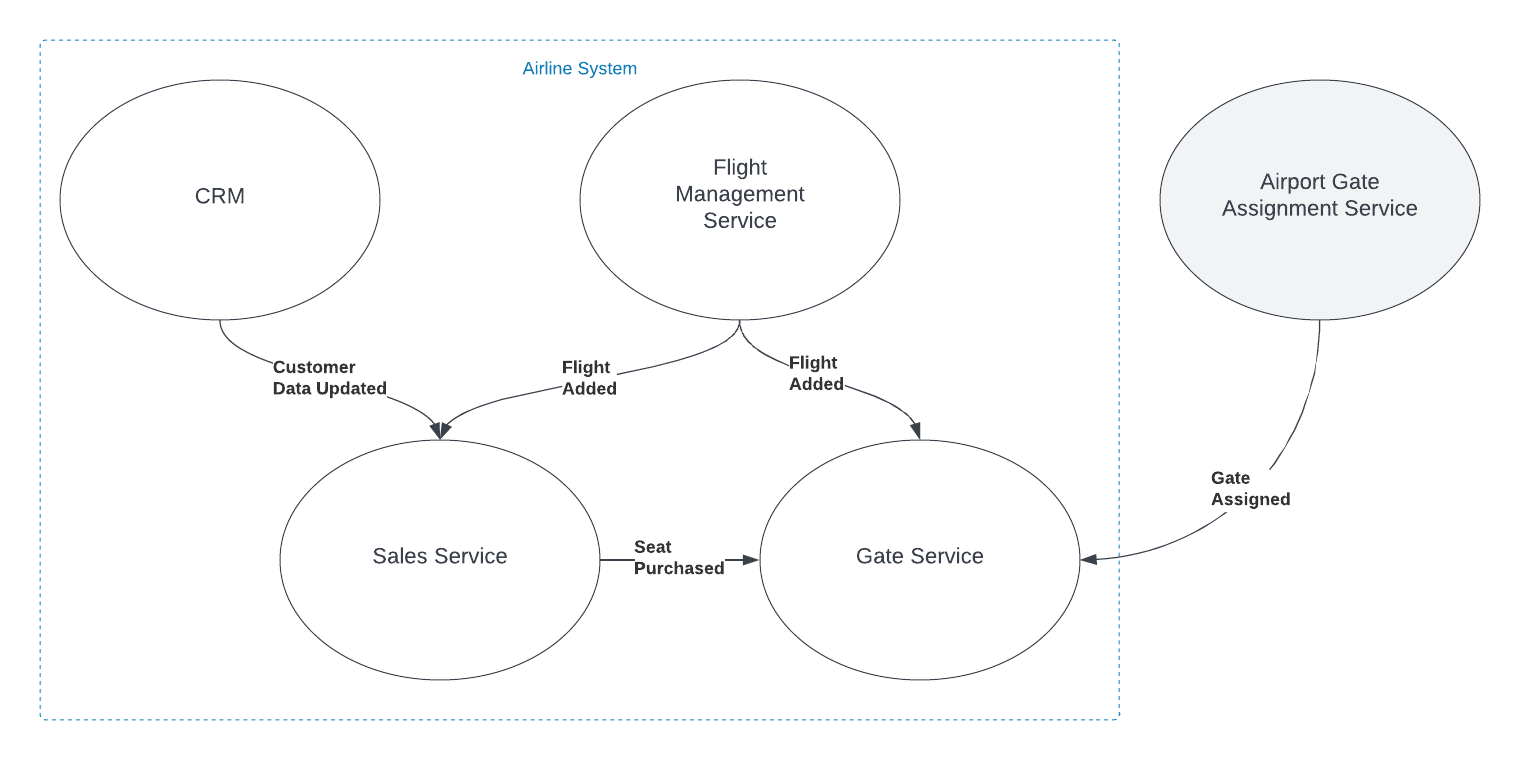
In the simplified example shown in the graphic, both the Sales and Gate services need to know when a new flight is created so they can start capturing relevant information about that flight. There is nothing special about the relationship however. The fact that the object has the same name, and in some ways represents an equivalent concept, is immaterial to those subsystems. The domain events are captured and acted on in the same way as they would be if the object did not have the same name.
You can think about it as analogous to a relational database where there are two tables that have columns with the same names. The two columns may represent the same or similar concepts, but unless there are referential integrity rules in place to force them to be the same value, they are actually distinct and should be treated as such.
I do recognize that there are likely to be situations where a Shared Kernel can be beneficial. If the 'Flight' object has common attributes and behaviors that are stable and unlikely to change, including it in the Shared Kernel could reduce duplication without increasing coupling to an unnaceptable degree, especially if there is only a single team developing and maintaining both contexts. I have found however, that this is rarely the case, especially since, in many large and/or growing organizations, team construction and application ownership can easily change. Managing shared entities across multiple teams usually ends up with one of the teams having to wait for the other, hurting agility. I have found it very rare in my experience that the added complexity of an object in the Shared Kernel is worth the little bit of duplicated code that is removed, when that object is not viewed identically across the entire domain.
Ultimately, the decision to link objects across bounded contexts or include them in a Shared Kernel should be based on a deep understanding of the domain and the specific requirements and constraints of the project. If it isn't clear that an entity is seen identically across the entirety of a domain, distinct views of that object should be represented separately inside their appropriate bounded contexts. If you are struggling with this type of question, I reccommend Event Storming to help gain the needed understanding of the domain.
Tags: development principle ddd
The Depth of GPT Embeddings
Posted by bsstahl on 2023-10-03 and Filed Under: tools
I've been trying to get a handle on the number of representations possible in a GPT vector and thought others might find this interesting as well. For the purposes of this discussion, a GPT vector is a 1536 dimensional structure that is unit-length, encoded using the text-embedding-ada-002 embedding model.
We know that the number of theoretical representations is infinite, being that there are an infinite number of possible values between 0 and 1, and thus an infinite number of values between -1 and +1. However, we are not working with truly infinite values since we need to be able to represent them in a computer. This means that we are limited to a finite number of decimal places. Thus, we may be able to get an approximation for the number of possible values by looking at the number of decimal places we can represent.
Calculating the number of possible states
I started by looking for a lower-bound for the value, and incresing fidelity from there. We know that these embeddings, because they are unit-length, can take values from -1 to +1 in each dimension. If we assume temporarily that only integer values are used, we can say there are only 3 possible states for each of the 1536 dimensions of the vector (-1, 0 +1). A base (B) of 3, with a digit count (D) of 1536, which can by supplied to the general equation for the number of possible values that can be represented:
V = BD or V = 31536
The result of this calculation is equivalent to 22435 or 10733 or, if you prefer, a number of this form:
10000000000000000000000000000000000000000000000000000000000000000000000000000000000000000000000000000000000000000000000000000000000000000000000000000000000000000000000000000000000000000000000000000000000000000000000000000000000000000000000000000000000000000000000000000000000000000000000000000000000000000000000000000000000000000000000000000000000000000000000000000000000000000000000000000000000000000000000000000000000000000000000000000000000000000000000000000000000000000000000000000000000000000000000000000000000000000000000000000000000000000000000000000000000000000000000000000000000000000000000000000000000000000000000000000000000000000000000000000000000000000000000000000000000000000000000000000000000000000000000000000000000000
Already an insanely large number. For comparison, the number of atoms in the universe is roughly 1080.
We now know that we have at least 10733 possible states for each vector. But that is just using integer values. What happens if we start increasing the fidelity of our value. The next step is to assume that we can use values with a single decimal place. That is, the numbers in each dimension can take values such as 0.1 and -0.5. This increases the base in the above equation by a factor of 10, from 3 to 30. Our new values to plug in to the equation are:
V = 301536
Which is equivalent to 27537 or 102269.
Another way of thinking about these values is that they require a data structure not of 32 or 64 bits to represent, but of 7537 bits. That is, we would need a data structure that is 7537 bits long to represent all of the possible values of a vector that uses just one decimal place.
We can continue this process for a few more decimal places, each time increasing the base by a factor of 10. The results can be found in the table below.
| B | Example | Base-2 | Base-10 |
|---|---|---|---|
| 3 | 1 | 2435 | 733 |
| 30 | 0.1 | 7537 | 2269 |
| 300 | 0.01 | 12639 | 3805 |
| 3000 | 0.001 | 17742 | 5341 |
| 30000 | 0.0001 | 22844 | 6877 |
| 300000 | 0.00001 | 27947 | 8413 |
| 3000000 | 0.000001 | 33049 | 9949 |
| 30000000 | 0.0000001 | 38152 | 11485 |
| 300000000 | 0.00000001 | 43254 | 13021 |
| 3000000000 | 0.000000001 | 48357 | 14557 |
| 30000000000 | 1E-10 | 53459 | 16093 |
| 3E+11 | 1E-11 | 58562 | 17629 |
This means that if we assume 7 decimal digits of precision in our data structures, we can represent 1011485 distinct values in our vector.
This number is so large that all the computers in the world, churning out millions of values per second for the entire history (start to finish) of the universe, would not even come close to being able to generate all of the possible values of a single vector.
What does all this mean?
Since we currently have no way of knowing how dense the representation of data inside the GPT models is, we can only guess at how many of these possible values actually represent ideas. However, this analysis gives us a reasonable proxy for how many the model can hold. If there is even a small fraction of this information encoded in these models, then it is nearly guaranteed that these models hold in them insights that have never before been identified by humans. We just need to figure out how to access these revelations.
That is a discussion for another day.
Tags: ai embedding
Feature Flags: Don't Roll Your Own
Posted by bsstahl on 2023-08-14 and Filed Under: development
In my previous post, I discussed situations where we tend to overvalue visible costs and undervalue more hidden costs. One example of this dynamic is the tendency to want to roll-your-own feature-flagging system.
Feature flags are a powerful tool for controlling the availability and behavior of features in your software. They allow you to turn features on or off at runtime, without deploying new code, and target specific segments of users with different variations of your features. This enables you to experiment, test, and release features faster and safer than ever before.
But feature flags are not something you should implement yourself. Rolling your own feature flags may seem like a simple and cost-effective solution, but it comes with many hidden pitfalls and risks that can undermine your software quality, performance, security, and maintainability. Ultimately, rolling your own feature flag system may end up costing you much more than using an existing product.
We should always have a strong bias against building anything that falls outside of our team's core competencies, but feature flags in particular have their own special set of concerns, especially since, on the surface, it seems like such a simple problem.
Here are some of the specific reasons why you should avoid rolling your own feature flags:
Complexity: Implementing feature flags requires more than just adding some if statements to your code. You need to design a robust system for managing, storing, updating, evaluating, and auditing your feature flags across different environments, platforms, services, and teams. You also need to handle edge cases such as flag dependencies, conflicts, defaults, fallbacks, rollbacks, etc. This adds a lot of complexity and overhead to your codebase that can introduce bugs, errors, inconsistencies, and technical debt.
Performance: Evaluating feature flags at runtime can have a significant impact on your application's performance if not done properly. You need to ensure that your feature flag system is fast, scalable, reliable, resilient, and secure. You also need to optimize your flag evaluation logic for minimal latency and resource consumption. If you roll your own feature flags without proper performance testing and monitoring tools, you may end up slowing down or crashing your application due to excessive network calls, database queries, memory usage, or CPU cycles.
Security: Feature flags can expose sensitive information or functionality that should not be accessible by unauthorized users or attackers. You need to ensure that your feature flag system is secure from both internal and external threats. You also need to comply with any regulatory or legal requirements for data privacy and protection. If you roll your own feature flags without proper security measures and best practices, you may end up leaking confidential data or compromising your application's integrity.
Maintainability: Feature flags are meant to be temporary switches that enable or disable features until they are ready for full release or removal. However, if you roll your own feature flags without proper management tools and processes, you may end up with a large number of stale or unused flags that clutter or pollute your codebase. This makes it harder to understand or modify your code, increases the risk of errors or conflicts, and reduces the readability or testability of your code.
As you can see, rolling your own feature flags is not as easy as it sounds. It requires a lot of time, effort, skill, and discipline to do it well. And even if you manage that nebulous challenge at rollout, you still have to maintain and extend the system for the life of the products that use it.
That's why you should use a feature flag management platform instead. A feature flag management platform provides you with all the tools and services you need to implement and manage feature flags effectively and efficiently.
With a feature flag management platform:
You can create and update feature flags easily using a user-friendly interface or API.
You can target specific segments of users based on various criteria such as location, device type, user behavior, etc.
You can monitor and measure the impact of your features on key metrics such as conversion rates, engagement levels, error rates, etc.
You can control the rollout speed and strategy of your features using various methods such as percentage-based splits, canary releases, blue-green deployments, etc.
You can integrate with various tools such as CI/CD pipelines, testing frameworks, analytics platforms, etc. to streamline your development and delivery workflows.
You can ensure the performance, security, reliability, scalability, of your feature flag system using advanced techniques such as caching, encryption, failover mechanisms, load balancing, etc.
You can manage the lifecycle of your feature flags using best practices such as naming conventions, documentation, flag retirement policies, etc.
A feature flag management platform takes care of all these aspects for you, so you can focus on building and delivering great features for your customers.
There are many feature flag management platforms available in the market, such as LaunchDarkly, Split, Optimizely, Taplytics, etc. Each platform has its own features, pricing, and integrations that you can compare and choose from based on your needs and preferences.
However, regardless of which platform you use, there are some best practices that you should follow when using feature flags. These best practices will help you avoid common pitfalls and maximize the benefits of feature flags for your software development and delivery process.
Here are some of the best practices that you should know:
Use a consistent system for feature flag management: It doesn't matter if you use a feature flag management tool or a custom solution, as long as you have a consistent system for creating, updating, and deleting your feature flags. You should also have a clear ownership and accountability model for each flag, so that you know who is responsible for what.
Set naming conventions for different types of feature flags: You can implement feature flags to achieve many different goals, such as testing, experimenting, releasing, or hiding features. You should use descriptive and meaningful names for your flags that indicate their purpose and scope. You should also use prefixes or suffixes to distinguish between different types of flags, such as release flags, experiment flags, kill switches, etc.
Make it easy to switch a flag on/off: You should be able to turn a feature flag on or off with minimal effort and delay. You should also be able to override or modify a flag's settings at any time without redeploying your code. This will allow you to react quickly and flexibly to any changes or issues that may arise during your feature development or delivery cycle.
Make feature flag settings visible: You should be able to see and monitor the current state and configuration of each feature flag at any given time. You should also be able to track and audit the history and usage of each flag across different environments, platforms, services, and teams. This will help you ensure transparency and traceability of your feature development and delivery process.
Clean up obsolete flags: You should remove any feature flags that are no longer needed or used as soon as possible. This will prevent cluttering or polluting your codebase with unnecessary or outdated code paths that can increase complexity or introduce errors or conflicts¹⁶.
Some additional recommendations are:
Avoid dependencies between flags: You should avoid creating complex dependencies or interactions between different feature flags that can make it hard to understand or predict their behavior or impact. You should also avoid nesting or chaining multiple flags within each other that can increase latency or resource consumption.
Use feature switches to avoid code branches: You should use simple boolean expressions to evaluate your feature flags rather than creating multiple code branches with if/else statements. This will reduce code duplication and improve readability and testability of your code.
Use feature flags for small test releases: You should use feature flags to release small batches of features incrementally rather than releasing large groups of features altogether. This will allow you to test and validate your features with real users in production without affecting everyone at once. It will also enable you to roll back or fix any issues quickly if something goes wrong.
By following these best practices, you can leverage the power of feature flags without compromising on quality, performance, security, or maintainability.
Some Open Source Feature Flag Systems
Yes, there are some open source projects that support feature flag management. For example:
GrowthBook: GrowthBook is an open source feature management and experimentation platform that helps your engineering team adopt an experimentation culture. It enables you to create gradual or canary releases with user targeting, run A/B tests, track key metrics, and integrate with various data sources.
Flagsmith: Flagsmith is an open source feature flag and remote config service that makes it easy to create and manage features flags across web, mobile, and server side applications. It allows you to control feature access, segment users, toggle features on/off, and customize your app behavior without redeploying your code.
Unleash: Unleash is an open source feature flag management system that helps you deploy new features at high speed. It lets you decouple deployment from release, run experiments easily, scale as your business grows, and integrate with various tools and platforms.
These are just some examples of open source feature flag management projects. There may be others that suit your needs better.
Feature flags are an essential tool for modern software development and delivery. They enable you to deliver faster, safer, and better features for your customers while reducing risk and cost. But don't try to roll your own feature flags unless you have a good reason and enough resources to do so. Instead, use a professional feature flag management platform that provides you with all the tools and services you need to implement and manage feature flags effectively and efficiently.
Disclaimer: My teams use LaunchDarkly for feature-flagging but I am not affiliated with that product or company in any way. I am also not associated with any similar product or company that makes such a product and have not received, nor will I receive, any compensation of any type, either direct or indirect, for this article.
Tags: architecture coding-practices
Consider Quality Before Cost in Application Development
Posted by bsstahl on 2023-08-04 and Filed Under: development
Assessing the costs associated with using a specific tool is usually more straightforward than evaluating the less tangible costs related to an application's life-cycle, such as those tied to quality. This can result in an excessive focus on cost optimization, potentially overshadowing vital factors like reliability and maintainability.
As an example, consider a solution that uses a Cosmos DB instance. It is easy to determine how much it costs to use that resource, since the Azure Portal gives us good estimates up-front, and insights as we go. It is much more difficult to determine how much it would cost to build the same functionality without the use of that Cosmos DB instance, and what the scalability and maintainability impacts of that decision would be.
In this article, we will consider a set of high-level guidelines that can help you identify when to consider costs during the development process. By following these guidelines, you can make it more likely that your dev team accurately prioritizes all aspects of the application without falling into the trap of over-valuing easily measurable costs.
1. Focus on Quality First
As a developer, your primary objective should be to create applications that meet the customers needs with the desired performance, reliability, scalability, and maintainability characteristics. If we can meet a user need using a pre-packaged solution such as Cosmos DB or MongoDB, we should generally do so. While there are some appropriate considerations regarding cost here, the primary focus of the development team should be on quality.
Using Cosmos DB as an example, we can leverage its global distribution, low-latency, and high-throughput capabilities to build applications that cater to a wide range of user needs. If Cosmos DB solves the current problem effectively, we probably shouldn't even consider building without it or an equivalent tool, simply for cost savings. An additional part of that calculus, whether or not we consider the use of that tool a best-practice in our organization, falls under item #2 below.
2. Employ Best Practices and Expert Advice
During the development of an application, it's essential to follow best practices and consult experts to identify areas for improvement or cost-effectiveness without compromising quality. Since most problems fall into a type that has already been solved many times, the ideal circumstance is that there is already a best-practice for solving problems of the type you are currently facing. If your organization has these best-practices or best-of-breed tools identified, there is usually no need to break-out of that box.
In the context of Cosmos DB, you can refer to Microsoft's performance and optimization guidelines or consult with your own DBAs to ensure efficient partitioning, indexing, and query optimization. For instance, you can seek advice on choosing the appropriate partition key to ensure even data distribution and avoid hot-spots. Additionally, you can discuss the optimal indexing policy to balance the trade-off between query performance and indexing cost, and define the best time-to-live (TTL) for data elements that balance the need for historical data against query costs. If you are seeing an uneven distribution of data leading to higher consumption of RU/s, you can look at adjusting the partition key. If you need to query data in several different ways, you might consider using the Materialized View pattern to make the same data queryable using different partitioning strategies. All of these changes however have their own implementation costs, and potentially other costs, that should be considered.
3. Establish Cost Thresholds
Defining acceptable cost limits for different aspects of your application ensures that costs don't spiral out of control while maintaining focus on quality. In the case of Cosmos DB, you can set cost thresholds for throughput (RU/s), storage, and data transfer. For instance, you can define a maximum monthly budget for provisioned throughput based on the expected workload and adjust it as needed. This can help you monitor and control costs without affecting the application's performance. You can also setup alerts to notify you when the costs exceed the defined thresholds, giving you an opportunity to investigate and take corrective action.
Limits can be defined similarly to the way any other SLA is defined, generally by looking at existing systems and determining what normal looks like. This mechanism has the added benefit of treating costs in the same way as other metrics, making it no more or less important than throughput, latency, or uptime.
4. Integrate Cost Checks into Code Reviews and Monitoring
A common strategy for managing costs is to introduce another ceremony specifically related to spend, such as a periodic cost review. Instead of creating another mandated set of meetings that tend to shift the focus away from quality, consider incorporating cost-related checks into your existing code review and monitoring processes, so that cost becomes just one term in the overall equation:
- Code review integration: During code review sessions, include cost-related best practices along with other quality checks. Encourage developers to highlight any potential cost inefficiencies or violations of best practices that may impact the application's costs in the same way as they highlight other risk factors. Look for circumstances where the use of resources is unusual or wasteful.
- Utilize tools for cost analysis: Leverage tools and extensions that can help you analyze and estimate costs within your development environment. For example, you can use Azure Cost Management tools to gain insights into your Cosmos DB usage patterns and costs. Integrating these tools into your development process can help developers become more aware of the cost implications of their code changes, and act in a similar manner to quality analysis tools, making them just another piece of the overall puzzle, instead of a special-case for costs.
- Include cost-related SLOs: As part of your performance monitoring, include cost-related SLIs and SLOs, such as cost per request or cost per user, alongside other important metrics like throughput and latency. This will help you keep an eye on costs without overemphasizing them and ensure they are considered alongside other crucial aspects of your application.
5. Optimize Only When Necessary
If cost inefficiencies are identified during code reviews or monitoring, assess the trade-offs and determine if optimization is necessary without compromising the application's quality. If cost targets are being exceeded by a small amount, and are not climbing rapidly, it may be much cheaper to simply adjust the target. If target costs are being exceeded by an order-of-magnitude, or if they are rising rapidly, that's when it probably makes sense to address the issues. There may be other circumstances where it is apporpriate to prioritize these types of costs, but always be aware that there are costs to making these changes too, and they may not be as obvious as those that are easily measured.
Conclusion
Balancing quality and cost in application development is crucial for building successful applications. By focusing on quality first, employing best practices, establishing cost thresholds, and integrating cost checks into your existing code review and monitoring processes, you can create an environment that considers all costs of application development, without overemphasizing those that are easy to measure.
Tags: architecture coding-practices reliability
Continuing a Conversation on LLMs
Posted by bsstahl on 2023-04-13 and Filed Under: tools
This post is the continuation of a conversation from Mastodon. The thread begins here.
Update: I recently tried to recreate the conversation from the above link and had to work far harder than I would wish to do so. As a result, I add the following GPT summary of the conversation. I have verified this summary and believe it to be an accurate, if oversimplified, representation of the thread.
The thread discusses the value and ethical implications of Language Learning Models (LLMs).
@arthurdoler@mastodon.sandwich.net criticizes the hype around LLMs, arguing that they are often used unethically, or suffer from the same bias and undersampling problems as previous machine learning models. He also questions the value they bring, suggesting they are merely language toys that can't create anything new but only reflect what already exists.
@bsstahl@CognitiveInheritance.com, however, sees potential in LLMs, stating that they can be used to build amazing things when used ethically. He gives an example of how even simple autocomplete tools can help generate new ideas. He also mentions how earlier LLMs like Word2Vec were able to find relationships that humans couldn't. He acknowledges the potential dangers of these tools in the wrong hands, but encourages not to dismiss them entirely.
@jeremybytes@mastodon.sandwich.net brings up concerns about the misuse of LLMs, citing examples of false accusations made by ChatGPT. He points out that people are treating the responses from these models as facts, which they are not designed to provide.
@bsstahl@CognitiveInheritance.com agrees that misuse is a problem but insists that these tools have value and should be used for legitimate purposes. He argues that if ethical developers don't use these tools, they will be left to those who misuse them.
I understand and share your concerns about biased training data in language models like GPT. Bias in these models exists and is a real problem, one I've written about in the past. That post enumerates my belief that it is our responsibility as technologists to understand and work around these biases. I believe we agree in this area. I also suspect that we agree that the loud voices with something to sell are to be ignored, regardless of what they are selling. I hope we also agree that the opinions of these people should not bias our opinions in any direction. That is, just because they are saying it, doesn't make it true or false. They should be ignored, with no attention paid to them whatsoever regarding the truth of any general proposition.
Where we clearly disagree is this: all of these technologies can help create real value for ourselves, our users, and our society.
In some cases, like with crypto currencies, that value may never be realized because the scale that is needed to be successful with it is only available to those who have already proven their desire to fleece the rest of us, and because there is no reasonable way to tell the scammers from legit-minded individuals when new products are released. There is also no mechanism to prevent a takeover of such a system by those with malicious intent. This is unfortunate, but it is the state of our very broken system.
This is not the case with LLMs, and since we both understand that these models are just a very advanced version of autocomplete, we have at least part of the understanding needed to use them effectively. It seems however we disagree on what that fact (that it is an advanced autocomplete) means. It seems to me that LLMs produce derivative works in the same sense (not method) that our brains do. We, as humans, do not synthesize ideas from nothing, we build on our combined knowledge and experience, sometimes creating things heretofore unseen in that context, but always creating derivatives based on what came before.
Word2Vec uses a 60-dimensional vector store. GPT-4 embeddings have 1536 dimensions. I certainly cannot consciously think in that number of dimensions. It is plausible that my subconscious can, but that line of thinking leads to the the consideration of the nature of consciousness itself, which is not a topic I am capable of debating, and somewhat ancillary to the point, which is: these tools have value when used properly and we are the ones who can use them in valid and valuable ways.
The important thing is to not listen to the loud voices. Don't even listen to me. Look at the tools and decide for yourself where you find value, if any. I suggest starting with something relatively simple, and working from there. For example, I used Bing chat during the course of this conversation to help me figure out the right words to use. I typed in a natural-language description of the word I needed, which the LLM translated into a set of possible intents. Bing then used those intents to search the internet and return results. It then used GPT to summarize those results into a short, easy to digest answer along with reference links to the source materials. I find this valuable, I think you would too. Could I have done something similar with a thesaurus, sure. Would it have taken longer: probably. Would it have resulted in the same answer: maybe. It was valuable to me to be able to describe what I needed, and then fine-tune the results, sometimes playing-off of what was returned from the earlier requests. In that way, I would call the tool a force-multiplier.
Yesterday, I described a fairly complex set of things I care to read about when I read social media posts, then asked the model to evaluate a bunch of posts and tell me whether I might care about each of those posts or not. I threw a bunch of real posts at it, including many where I was trying to trick it (those that came up in typical searches but I didn't really care about, as well as the converse). It "understood" the context (probably due to the number of dimensions in the model and the relationships therein) and labeled every one correctly. I can now use an automated version of this prompt to filter the vast swaths of social media posts down to those I might care about. I could then also ask the model to give me a summary of those posts, and potentially try to synthesize new information from them. I would not make any decisions based on that summary or synthesis without first verifying the original source materials, and without reasoning on it myself, and I would not ever take any action that impacts human beings based on those results. Doing so would be using these tools outside of their sphere of capabilities. I can however use that summary to identify places for me to drill-in and continue my evaluation, and I believe, can use them in certain circumstances to derive new ideas. This is valuable to me.
So then, what should we build to leverage the capabilities of these tools to the benefit of our users, without harming other users or society? It is my opinion that, even if these tools only make it easier for us to allow our users to interact with our software in more natural ways, that is, in itself a win. These models represent a higher-level of abstraction to our programming. It is a more declarative mechanism for user interaction. With any increase in abstraction there always comes an increase in danger. As technologists it is our responsibility to understand those dangers to the best of our abilities and work accordingly. I believe we should not be dismissing tools just because they can be abused, and there is no doubt that some certainly will abuse them. We need to do what's right, and that may very well involve making sure these tools are used in ways that are for the benefit of the users, not their detriment.
Let me say it this way: If the only choices people have are to use tools created by those with questionable intent, or to not use these tools at all, many people will choose the easy path, the one that gives them some short-term value regardless of the societal impact. If we can create value for those people without malicious intent, then the users have a choice, and will often choose those things that don't harm society. It is up to us to make sure that choice exists.
I accept that you may disagree. You know that I, and all of our shared circle to the best of my knowledge, find your opinion thoughtful and valuable on many things. That doesn't mean we have to agree on everything. However, I hope that disagreement is based on far more than just the mistrust of screaming hyperbolists, and a misunderstanding of what it means to be a "overgrown autocomplete".
To be clear here, it is possible that it is I who is misunderstanding these capabilities. Obviously, I don't believe that to be the case but it is always a possibility, especially as I am not an expert in the field. Since I find the example you gave about replacing words in a Shakespearean poem to be a very obvious (to me) false analog, it is clear that at lease one of us, perhaps both of us, are misunderstanding its capabilities.
I still think it would be worth your time, and a benefit to society, if people who care about the proper use of these tools, would consider how they could be used to society's benefit rather than allowing the only use to be by those who care only about extracting value from users. You have already admitted there are at least "one and a half valid use cases for LLMs". I'm guessing you would accept then that there are probably more you haven't seen yet. Knowing that, isn't it our responsibility as technologists to find those uses and work toward creating the better society we seek, rather than just allowing extremists to use it to our detriment.
Update: I realize I never addressed the issue of the models being trained on licensed works.
Unless a model builder has permission from a user to train their models using that user's works, be it an OSS or Copyleft license, explicit license agreement, or direct permission, those items should not be used to train models. If it is shown that a model has been trained using such data sets, and there have been indications (unproven as yet to my knowledge) that this may be the case for some models, especially image-generators, then that is a problem with those models that needs to be addressed. It does not invalidate the general use of these models, nor is it an indictment of any person or model except those in violation. Our trademark and copyright systems are another place where we, as a society, have completely fallen-down. Hopefully, that collapse will not cause us to forsake the value that these tools can provide.
Tags: coding-practices development enterprise responsibility testing ai algorithms ethics mastodon
Beta Tools and Wait-Lists
Posted by bsstahl on 2023-04-12 and Filed Under: tools
Here's a problem I am clearly privileged to have. I'll be working on a project and run into a problem. I search the Internet for ways to solve that problem and find a beta product that looks like a very interesting, innovative way to solve that problem. So, I sign up for the beta and end up getting put on a waitlist. This doesn't help me, at least not right now. So, I go off and find another way to solve my problem and continue doing what I'm doing and forget all about the beta program that I signed up for.
Then, at some point, I get an email from them saying congratulations you've been accepted to our beta program. Well, guess what? I don't even remember who you are or what problem I was trying to solve anymore or even if I actually even signed up for it. In fact, most of the time that I get emails like that, I just assume that it is another spam email.
I understand there are valid reasons for sometimes putting customers on wait-lists. I also understand that sometimes companies just try to create artificial scarcity so that their product takes on a cool factor. Please know that, if this is what you're doing, you're likely losing as many customers as you would gain if not more, and may be putting your very existence at risk.
I wonder how many cool products I've missed out on because of that delay in getting access? I wonder how many cool products just died because they weren't there for people when they actually needed them?
Tags: ethics
Microservices: Size Doesn't Matter, Reliability Does
Posted by bsstahl on 2023-02-20 and Filed Under: development
There are conflicting opinions among architects about how many microservices a distributed system should have, and the size of those services. Some may say that a particular design has too many microservices, and that it should be consolidated into fewer, larger services to reduce deployment and operational complexity. Others may say that the same design doesn't have enough microservices, and that it should be broken-down into smaller, more granular services to reduce code complexity and improve team agility. Aside from the always true and rarely helpful "it depends...", is there good guidance on the subject?
The truth is, the number and size of microservices is not a measure of quality or performance unto itself, it is a design decision based on one primary characteristic, Reliability. As such, there is a simple rule guiding the creation of services, but it isn't based on the size or quantity of services. The rule is based entirely on how much work a service does.
After security, reliability is the most important attribute of any system, because it affects the satisfaction of both the users and developers, as well as the productivity and agility of the development and support teams. A reliable system has the following characteristics:
- It performs its duties as expected
- It has minimal failures where it has to report to the user that it is unable to perform its duties
- It has minimal downtime when it cannot be reached and opportunities may be lost
- It recovers itself automatically when outages do occur, without data loss
Having reliable systems means that your support engineers won't be constantly woken-up in the middle of the night to deal with outages, and your customers will remain satisfied with the quality of the product.
How do we build reliable systems with microservices?
The key to building reliable systems using microservices is to follow one simple rule: avoid dual-writes. A dual-write is when a service makes more than one change to system state within an execution context. Dual-writes are the enemy of reliability, because they create the risk of inconsistency, data loss, and data corruption.
For example, a web API that updates a database and sends a message to a queue during the execution of a single web request is performing a dual-write since it is making two different changes to the state of the system, and both of the changes are expected to occur reliably. If one of the writes succeeds and the other fails, the system state becomes out of sync and system behavior becomes unpredictable. The errors created when these types of failures occur are often hard to find and remediate because they can present very differently depending on the part of the process being executed when the failure happened.
The best-practice is to allow microservices to perform idempotent operations like database reads as often as they need, but to only write data once. An atomic update to a database is an example of such a write, regardless of how many tables or collections are updated during that process. In this way, we can keep the state of each service consistent, and the system behavior deterministic. If the process fails even part-way through, we know how to recover, and can often do it automatically.
Building this type of system does require a change in how we design our services. In the past, it was very common for us to make multiple changes to a system's state, especially inside a monolithic application. To remain reliable, we need to leverage tools like Change Data Capture (CDC), which is available in most modern database systems, or the Transactional Outbox Pattern so that we can write our data once, and have that update trigger other activities downstream.
Since microservices are sized to avoid dual-writes, the number of microservices in a system is determined by what they do and how they interact. The number of microservices is not a fixed or arbitrary number, but a result of the system design and the business needs. By following the rule of avoiding dual-writes, you can size your microservices appropriately, and achieve a system that is scalable and adaptable, but most of all, reliable. Of course, this practice alone will not guarantee the reliability of your systems, but it will make reliability possible, and is the best guideline I've found for sizing microservices.
For more detail on how to avoid the Dual-Writes Anti-Pattern, please see my article from December 2022 on The Execution Context.
