Objects with the Same Name in Different Bounded Contexts
Posted by bsstahl on 2023-10-29 and Filed Under: development
Imagine you're working with a Flight entity within an airline management system. This object exists in at least two (probably more) distinct execution spaces or 'bounded contexts': the 'passenger pre-purchase' context, handled by the sales service, and the 'gate agent' context, managed by the Gate service.
In the 'passenger pre-purchase' context, the 'Flight' object might encapsulate attributes like ticket price and seat availability and have behaviors such as 'purchase'. In contrast, the 'gate agent' context might focus on details like gate number and boarding status, and have behaviors like 'check-in crew member' and 'check-in passenger'.
Some questions often arise in this situation: Should we create a special translation between the flight entities in these two contexts? Should we include the 'Flight' object in a Shared Kernel to avoid duplication, adhering to the DRY (Don't Repeat Yourself) principle?
My default stance is to treat objects with the same name in different bounded contexts as distinct entities. I advocate for each context to have the autonomy to define and operate on its own objects, without the need for translation or linking. This approach aligns with the principle of low coupling, which suggests that components should be as independent as possible.
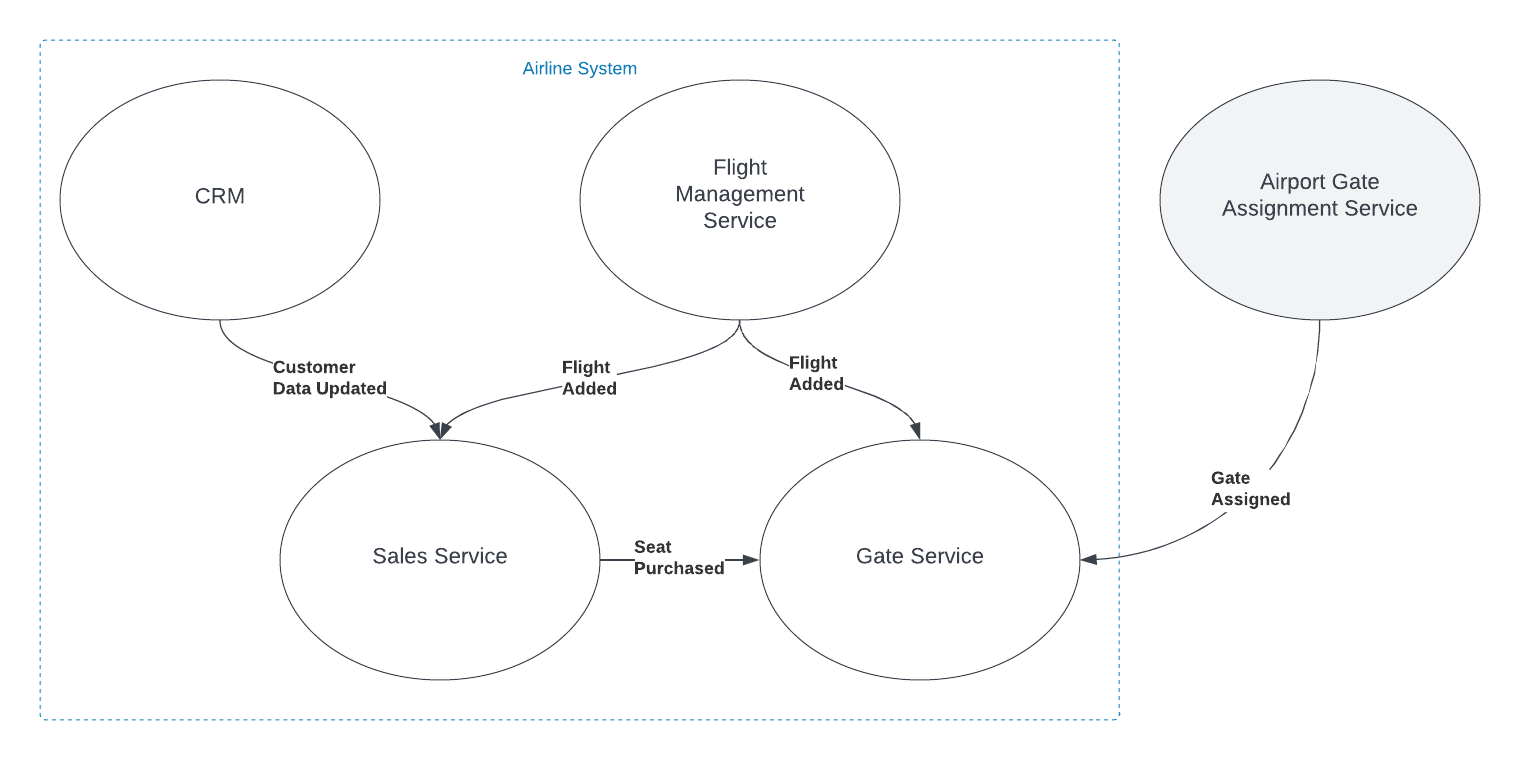
In the simplified example shown in the graphic, both the Sales and Gate services need to know when a new flight is created so they can start capturing relevant information about that flight. There is nothing special about the relationship however. The fact that the object has the same name, and in some ways represents an equivalent concept, is immaterial to those subsystems. The domain events are captured and acted on in the same way as they would be if the object did not have the same name.
You can think about it as analogous to a relational database where there are two tables that have columns with the same names. The two columns may represent the same or similar concepts, but unless there are referential integrity rules in place to force them to be the same value, they are actually distinct and should be treated as such.
I do recognize that there are likely to be situations where a Shared Kernel can be beneficial. If the 'Flight' object has common attributes and behaviors that are stable and unlikely to change, including it in the Shared Kernel could reduce duplication without increasing coupling to an unnaceptable degree, especially if there is only a single team developing and maintaining both contexts. I have found however, that this is rarely the case, especially since, in many large and/or growing organizations, team construction and application ownership can easily change. Managing shared entities across multiple teams usually ends up with one of the teams having to wait for the other, hurting agility. I have found it very rare in my experience that the added complexity of an object in the Shared Kernel is worth the little bit of duplicated code that is removed, when that object is not viewed identically across the entire domain.
Ultimately, the decision to link objects across bounded contexts or include them in a Shared Kernel should be based on a deep understanding of the domain and the specific requirements and constraints of the project. If it isn't clear that an entity is seen identically across the entirety of a domain, distinct views of that object should be represented separately inside their appropriate bounded contexts. If you are struggling with this type of question, I reccommend Event Storming to help gain the needed understanding of the domain.
The Depth of GPT Embeddings
Posted by bsstahl on 2023-10-03 and Filed Under: tools
I've been trying to get a handle on the number of representations possible in a GPT vector and thought others might find this interesting as well. For the purposes of this discussion, a GPT vector is a 1536 dimensional structure that is unit-length, encoded using the text-embedding-ada-002 embedding model.
We know that the number of theoretical representations is infinite, being that there are an infinite number of possible values between 0 and 1, and thus an infinite number of values between -1 and +1. However, we are not working with truly infinite values since we need to be able to represent them in a computer. This means that we are limited to a finite number of decimal places. Thus, we may be able to get an approximation for the number of possible values by looking at the number of decimal places we can represent.
Calculating the number of possible states
I started by looking for a lower-bound for the value, and incresing fidelity from there. We know that these embeddings, because they are unit-length, can take values from -1 to +1 in each dimension. If we assume temporarily that only integer values are used, we can say there are only 3 possible states for each of the 1536 dimensions of the vector (-1, 0 +1). A base (B) of 3, with a digit count (D) of 1536, which can by supplied to the general equation for the number of possible values that can be represented:
V = BD or V = 31536
The result of this calculation is equivalent to 22435 or 10733 or, if you prefer, a number of this form:
10000000000000000000000000000000000000000000000000000000000000000000000000000000000000000000000000000000000000000000000000000000000000000000000000000000000000000000000000000000000000000000000000000000000000000000000000000000000000000000000000000000000000000000000000000000000000000000000000000000000000000000000000000000000000000000000000000000000000000000000000000000000000000000000000000000000000000000000000000000000000000000000000000000000000000000000000000000000000000000000000000000000000000000000000000000000000000000000000000000000000000000000000000000000000000000000000000000000000000000000000000000000000000000000000000000000000000000000000000000000000000000000000000000000000000000000000000000000000000000000000000000000000
Already an insanely large number. For comparison, the number of atoms in the universe is roughly 1080.
We now know that we have at least 10733 possible states for each vector. But that is just using integer values. What happens if we start increasing the fidelity of our value. The next step is to assume that we can use values with a single decimal place. That is, the numbers in each dimension can take values such as 0.1 and -0.5. This increases the base in the above equation by a factor of 10, from 3 to 30. Our new values to plug in to the equation are:
V = 301536
Which is equivalent to 27537 or 102269.
Another way of thinking about these values is that they require a data structure not of 32 or 64 bits to represent, but of 7537 bits. That is, we would need a data structure that is 7537 bits long to represent all of the possible values of a vector that uses just one decimal place.
We can continue this process for a few more decimal places, each time increasing the base by a factor of 10. The results can be found in the table below.
| B | Example | Base-2 | Base-10 |
|---|
| 3 | 1 | 2435 | 733 |
| 30 | 0.1 | 7537 | 2269 |
| 300 | 0.01 | 12639 | 3805 |
| 3000 | 0.001 | 17742 | 5341 |
| 30000 | 0.0001 | 22844 | 6877 |
| 300000 | 0.00001 | 27947 | 8413 |
| 3000000 | 0.000001 | 33049 | 9949 |
| 30000000 | 0.0000001 | 38152 | 11485 |
| 300000000 | 0.00000001 | 43254 | 13021 |
| 3000000000 | 0.000000001 | 48357 | 14557 |
| 30000000000 | 1E-10 | 53459 | 16093 |
| 3E+11 | 1E-11 | 58562 | 17629 |
This means that if we assume 7 decimal digits of precision in our data structures, we can represent 1011485 distinct values in our vector.
This number is so large that all the computers in the world, churning out millions of values per second for the entire history (start to finish) of the universe, would not even come close to being able to generate all of the possible values of a single vector.
What does all this mean?
Since we currently have no way of knowing how dense the representation of data inside the GPT models is, we can only guess at how many of these possible values actually represent ideas. However, this analysis gives us a reasonable proxy for how many the model can hold. If there is even a small fraction of this information encoded in these models, then it is nearly guaranteed that these models hold in them insights that have never before been identified by humans. We just need to figure out how to access these revelations.
That is a discussion for another day.
Feature Flags: Don't Roll Your Own
Posted by bsstahl on 2023-08-14 and Filed Under: development
In my previous post, I discussed situations where we tend to overvalue visible costs and undervalue more hidden costs. One example of this dynamic is the tendency to want to roll-your-own feature-flagging system.
Feature flags are a powerful tool for controlling the availability and behavior of features in your software. They allow you to turn features on or off at runtime, without deploying new code, and target specific segments of users with different variations of your features. This enables you to experiment, test, and release features faster and safer than ever before.
But feature flags are not something you should implement yourself. Rolling your own feature flags may seem like a simple and cost-effective solution, but it comes with many hidden pitfalls and risks that can undermine your software quality, performance, security, and maintainability. Ultimately, rolling your own feature flag system may end up costing you much more than using an existing product.
We should always have a strong bias against building anything that falls outside of our team's core competencies, but feature flags in particular have their own special set of concerns, especially since, on the surface, it seems like such a simple problem.
Here are some of the specific reasons why you should avoid rolling your own feature flags:
Complexity: Implementing feature flags requires more than just adding some if statements to your code. You need to design a robust system for managing, storing, updating, evaluating, and auditing your feature flags across different environments, platforms, services, and teams. You also need to handle edge cases such as flag dependencies, conflicts, defaults, fallbacks, rollbacks, etc. This adds a lot of complexity and overhead to your codebase that can introduce bugs, errors, inconsistencies, and technical debt.
Performance: Evaluating feature flags at runtime can have a significant impact on your application's performance if not done properly. You need to ensure that your feature flag system is fast, scalable, reliable, resilient, and secure. You also need to optimize your flag evaluation logic for minimal latency and resource consumption. If you roll your own feature flags without proper performance testing and monitoring tools, you may end up slowing down or crashing your application due to excessive network calls, database queries, memory usage, or CPU cycles.
Security: Feature flags can expose sensitive information or functionality that should not be accessible by unauthorized users or attackers. You need to ensure that your feature flag system is secure from both internal and external threats. You also need to comply with any regulatory or legal requirements for data privacy and protection. If you roll your own feature flags without proper security measures and best practices, you may end up leaking confidential data or compromising your application's integrity.
Maintainability: Feature flags are meant to be temporary switches that enable or disable features until they are ready for full release or removal. However, if you roll your own feature flags without proper management tools and processes, you may end up with a large number of stale or unused flags that clutter or pollute your codebase. This makes it harder to understand or modify your code, increases the risk of errors or conflicts, and reduces the readability or testability of your code.
As you can see, rolling your own feature flags is not as easy as it sounds. It requires a lot of time, effort, skill, and discipline to do it well. And even if you manage that nebulous challenge at rollout, you still have to maintain and extend the system for the life of the products that use it.
That's why you should use a feature flag management platform instead. A feature flag management platform provides you with all the tools and services you need to implement and manage feature flags effectively and efficiently.
With a feature flag management platform:
You can create and update feature flags easily using a user-friendly interface or API.
You can target specific segments of users based on various criteria such as location, device type, user behavior, etc.
You can monitor and measure the impact of your features on key metrics such as conversion rates, engagement levels, error rates, etc.
You can control the rollout speed and strategy of your features using various methods such as percentage-based splits, canary releases, blue-green deployments, etc.
You can integrate with various tools such as CI/CD pipelines, testing frameworks, analytics platforms, etc. to streamline your development and delivery workflows.
You can ensure the performance, security, reliability, scalability, of your feature flag system using advanced techniques such as caching, encryption, failover mechanisms, load balancing, etc.
You can manage the lifecycle of your feature flags using best practices such as naming conventions, documentation, flag retirement policies, etc.
A feature flag management platform takes care of all these aspects for you, so you can focus on building and delivering great features for your customers.
There are many feature flag management platforms available in the market, such as LaunchDarkly, Split, Optimizely, Taplytics, etc. Each platform has its own features, pricing, and integrations that you can compare and choose from based on your needs and preferences.
However, regardless of which platform you use, there are some best practices that you should follow when using feature flags. These best practices will help you avoid common pitfalls and maximize the benefits of feature flags for your software development and delivery process.
Here are some of the best practices that you should know:
Use a consistent system for feature flag management: It doesn't matter if you use a feature flag management tool or a custom solution, as long as you have a consistent system for creating, updating, and deleting your feature flags. You should also have a clear ownership and accountability model for each flag, so that you know who is responsible for what.
Set naming conventions for different types of feature flags: You can implement feature flags to achieve many different goals, such as testing, experimenting, releasing, or hiding features. You should use descriptive and meaningful names for your flags that indicate their purpose and scope. You should also use prefixes or suffixes to distinguish between different types of flags, such as release flags, experiment flags, kill switches, etc.
Make it easy to switch a flag on/off: You should be able to turn a feature flag on or off with minimal effort and delay. You should also be able to override or modify a flag's settings at any time without redeploying your code. This will allow you to react quickly and flexibly to any changes or issues that may arise during your feature development or delivery cycle.
Make feature flag settings visible: You should be able to see and monitor the current state and configuration of each feature flag at any given time. You should also be able to track and audit the history and usage of each flag across different environments, platforms, services, and teams. This will help you ensure transparency and traceability of your feature development and delivery process.
Clean up obsolete flags: You should remove any feature flags that are no longer needed or used as soon as possible. This will prevent cluttering or polluting your codebase with unnecessary or outdated code paths that can increase complexity or introduce errors or conflicts¹⁶.
Some additional recommendations are:
Avoid dependencies between flags: You should avoid creating complex dependencies or interactions between different feature flags that can make it hard to understand or predict their behavior or impact. You should also avoid nesting or chaining multiple flags within each other that can increase latency or resource consumption.
Use feature switches to avoid code branches: You should use simple boolean expressions to evaluate your feature flags rather than creating multiple code branches with if/else statements. This will reduce code duplication and improve readability and testability of your code.
Use feature flags for small test releases: You should use feature flags to release small batches of features incrementally rather than releasing large groups of features altogether. This will allow you to test and validate your features with real users in production without affecting everyone at once. It will also enable you to roll back or fix any issues quickly if something goes wrong.
By following these best practices, you can leverage the power of feature flags without compromising on quality, performance, security, or maintainability.
Some Open Source Feature Flag Systems
Yes, there are some open source projects that support feature flag management. For example:
GrowthBook: GrowthBook is an open source feature management and experimentation platform that helps your engineering team adopt an experimentation culture. It enables you to create gradual or canary releases with user targeting, run A/B tests, track key metrics, and integrate with various data sources.
Flagsmith: Flagsmith is an open source feature flag and remote config service that makes it easy to create and manage features flags across web, mobile, and server side applications. It allows you to control feature access, segment users, toggle features on/off, and customize your app behavior without redeploying your code.
Unleash: Unleash is an open source feature flag management system that helps you deploy new features at high speed. It lets you decouple deployment from release, run experiments easily, scale as your business grows, and integrate with various tools and platforms.
These are just some examples of open source feature flag management projects. There may be others that suit your needs better.
Feature flags are an essential tool for modern software development and delivery. They enable you to deliver faster, safer, and better features for your customers while reducing risk and cost. But don't try to roll your own feature flags unless you have a good reason and enough resources to do so. Instead, use a professional feature flag management platform that provides you with all the tools and services you need to implement and manage feature flags effectively and efficiently.
Disclaimer: My teams use LaunchDarkly for feature-flagging but I am not affiliated with that product or company in any way. I am also not associated with any similar product or company that makes such a product and have not received, nor will I receive, any compensation of any type, either direct or indirect, for this article.
Consider Quality Before Cost in Application Development
Posted by bsstahl on 2023-08-04 and Filed Under: development
Assessing the costs associated with using a specific tool is usually more straightforward than evaluating the less tangible costs related to an application's life-cycle, such as those tied to quality. This can result in an excessive focus on cost optimization, potentially overshadowing vital factors like reliability and maintainability.
As an example, consider a solution that uses a Cosmos DB instance. It is easy to determine how much it costs to use that resource, since the Azure Portal gives us good estimates up-front, and insights as we go. It is much more difficult to determine how much it would cost to build the same functionality without the use of that Cosmos DB instance, and what the scalability and maintainability impacts of that decision would be.
In this article, we will consider a set of high-level guidelines that can help you identify when to consider costs during the development process. By following these guidelines, you can make it more likely that your dev team accurately prioritizes all aspects of the application without falling into the trap of over-valuing easily measurable costs.
1. Focus on Quality First
As a developer, your primary objective should be to create applications that meet the customers needs with the desired performance, reliability, scalability, and maintainability characteristics. If we can meet a user need using a pre-packaged solution such as Cosmos DB or MongoDB, we should generally do so. While there are some appropriate considerations regarding cost here, the primary focus of the development team should be on quality.
Using Cosmos DB as an example, we can leverage its global distribution, low-latency, and high-throughput capabilities to build applications that cater to a wide range of user needs. If Cosmos DB solves the current problem effectively, we probably shouldn't even consider building without it or an equivalent tool, simply for cost savings. An additional part of that calculus, whether or not we consider the use of that tool a best-practice in our organization, falls under item #2 below.
2. Employ Best Practices and Expert Advice
During the development of an application, it's essential to follow best practices and consult experts to identify areas for improvement or cost-effectiveness without compromising quality. Since most problems fall into a type that has already been solved many times, the ideal circumstance is that there is already a best-practice for solving problems of the type you are currently facing. If your organization has these best-practices or best-of-breed tools identified, there is usually no need to break-out of that box.
In the context of Cosmos DB, you can refer to Microsoft's performance and optimization guidelines or consult with your own DBAs to ensure efficient partitioning, indexing, and query optimization. For instance, you can seek advice on choosing the appropriate partition key to ensure even data distribution and avoid hot-spots. Additionally, you can discuss the optimal indexing policy to balance the trade-off between query performance and indexing cost, and define the best time-to-live (TTL) for data elements that balance the need for historical data against query costs. If you are seeing an uneven distribution of data leading to higher consumption of RU/s, you can look at adjusting the partition key. If you need to query data in several different ways, you might consider using the Materialized View pattern to make the same data queryable using different partitioning strategies. All of these changes however have their own implementation costs, and potentially other costs, that should be considered.
3. Establish Cost Thresholds
Defining acceptable cost limits for different aspects of your application ensures that costs don't spiral out of control while maintaining focus on quality. In the case of Cosmos DB, you can set cost thresholds for throughput (RU/s), storage, and data transfer. For instance, you can define a maximum monthly budget for provisioned throughput based on the expected workload and adjust it as needed. This can help you monitor and control costs without affecting the application's performance. You can also setup alerts to notify you when the costs exceed the defined thresholds, giving you an opportunity to investigate and take corrective action.
Limits can be defined similarly to the way any other SLA is defined, generally by looking at existing systems and determining what normal looks like. This mechanism has the added benefit of treating costs in the same way as other metrics, making it no more or less important than throughput, latency, or uptime.
4. Integrate Cost Checks into Code Reviews and Monitoring
A common strategy for managing costs is to introduce another ceremony specifically related to spend, such as a periodic cost review. Instead of creating another mandated set of meetings that tend to shift the focus away from quality, consider incorporating cost-related checks into your existing code review and monitoring processes, so that cost becomes just one term in the overall equation:
- Code review integration: During code review sessions, include cost-related best practices along with other quality checks. Encourage developers to highlight any potential cost inefficiencies or violations of best practices that may impact the application's costs in the same way as they highlight other risk factors. Look for circumstances where the use of resources is unusual or wasteful.
- Utilize tools for cost analysis: Leverage tools and extensions that can help you analyze and estimate costs within your development environment. For example, you can use Azure Cost Management tools to gain insights into your Cosmos DB usage patterns and costs. Integrating these tools into your development process can help developers become more aware of the cost implications of their code changes, and act in a similar manner to quality analysis tools, making them just another piece of the overall puzzle, instead of a special-case for costs.
- Include cost-related SLOs: As part of your performance monitoring, include cost-related SLIs and SLOs, such as cost per request or cost per user, alongside other important metrics like throughput and latency. This will help you keep an eye on costs without overemphasizing them and ensure they are considered alongside other crucial aspects of your application.
5. Optimize Only When Necessary
If cost inefficiencies are identified during code reviews or monitoring, assess the trade-offs and determine if optimization is necessary without compromising the application's quality. If cost targets are being exceeded by a small amount, and are not climbing rapidly, it may be much cheaper to simply adjust the target. If target costs are being exceeded by an order-of-magnitude, or if they are rising rapidly, that's when it probably makes sense to address the issues. There may be other circumstances where it is apporpriate to prioritize these types of costs, but always be aware that there are costs to making these changes too, and they may not be as obvious as those that are easily measured.
Conclusion
Balancing quality and cost in application development is crucial for building successful applications. By focusing on quality first, employing best practices, establishing cost thresholds, and integrating cost checks into your existing code review and monitoring processes, you can create an environment that considers all costs of application development, without overemphasizing those that are easy to measure.
Continuing a Conversation on LLMs
Posted by bsstahl on 2023-04-13 and Filed Under: tools
This post is the continuation of a conversation from Mastodon. The thread begins here.
Update: I recently tried to recreate the conversation from the above link and had to work far harder than I would wish to do so. As a result, I add the following GPT summary of the conversation. I have verified this summary and believe it to be an accurate, if oversimplified, representation of the thread.
The thread discusses the value and ethical implications of Language Learning Models (LLMs).
@arthurdoler@mastodon.sandwich.net criticizes the hype around LLMs, arguing that they are often used unethically, or suffer from the same bias and undersampling problems as previous machine learning models. He also questions the value they bring, suggesting they are merely language toys that can't create anything new but only reflect what already exists.
@bsstahl@CognitiveInheritance.com, however, sees potential in LLMs, stating that they can be used to build amazing things when used ethically. He gives an example of how even simple autocomplete tools can help generate new ideas. He also mentions how earlier LLMs like Word2Vec were able to find relationships that humans couldn't. He acknowledges the potential dangers of these tools in the wrong hands, but encourages not to dismiss them entirely.
@jeremybytes@mastodon.sandwich.net brings up concerns about the misuse of LLMs, citing examples of false accusations made by ChatGPT. He points out that people are treating the responses from these models as facts, which they are not designed to provide.
@bsstahl@CognitiveInheritance.com agrees that misuse is a problem but insists that these tools have value and should be used for legitimate purposes. He argues that if ethical developers don't use these tools, they will be left to those who misuse them.
I understand and share your concerns about biased training data in language models like GPT. Bias in these models exists and is a real problem, one I've written about in the past. That post enumerates my belief that it is our responsibility as technologists to understand and work around these biases. I believe we agree in this area. I also suspect that we agree that the loud voices with something to sell are to be ignored, regardless of what they are selling. I hope we also agree that the opinions of these people should not bias our opinions in any direction. That is, just because they are saying it, doesn't make it true or false. They should be ignored, with no attention paid to them whatsoever regarding the truth of any general proposition.
Where we clearly disagree is this: all of these technologies can help create real value for ourselves, our users, and our society.
In some cases, like with crypto currencies, that value may never be realized because the scale that is needed to be successful with it is only available to those who have already proven their desire to fleece the rest of us, and because there is no reasonable way to tell the scammers from legit-minded individuals when new products are released. There is also no mechanism to prevent a takeover of such a system by those with malicious intent. This is unfortunate, but it is the state of our very broken system.
This is not the case with LLMs, and since we both understand that these models are just a very advanced version of autocomplete, we have at least part of the understanding needed to use them effectively. It seems however we disagree on what that fact (that it is an advanced autocomplete) means. It seems to me that LLMs produce derivative works in the same sense (not method) that our brains do. We, as humans, do not synthesize ideas from nothing, we build on our combined knowledge and experience, sometimes creating things heretofore unseen in that context, but always creating derivatives based on what came before.
Word2Vec uses a 60-dimensional vector store. GPT-4 embeddings have 1536 dimensions. I certainly cannot consciously think in that number of dimensions. It is plausible that my subconscious can, but that line of thinking leads to the the consideration of the nature of consciousness itself, which is not a topic I am capable of debating, and somewhat ancillary to the point, which is: these tools have value when used properly and we are the ones who can use them in valid and valuable ways.
The important thing is to not listen to the loud voices. Don't even listen to me. Look at the tools and decide for yourself where you find value, if any. I suggest starting with something relatively simple, and working from there. For example, I used Bing chat during the course of this conversation to help me figure out the right words to use. I typed in a natural-language description of the word I needed, which the LLM translated into a set of possible intents. Bing then used those intents to search the internet and return results. It then used GPT to summarize those results into a short, easy to digest answer along with reference links to the source materials. I find this valuable, I think you would too. Could I have done something similar with a thesaurus, sure. Would it have taken longer: probably. Would it have resulted in the same answer: maybe. It was valuable to me to be able to describe what I needed, and then fine-tune the results, sometimes playing-off of what was returned from the earlier requests. In that way, I would call the tool a force-multiplier.
Yesterday, I described a fairly complex set of things I care to read about when I read social media posts, then asked the model to evaluate a bunch of posts and tell me whether I might care about each of those posts or not. I threw a bunch of real posts at it, including many where I was trying to trick it (those that came up in typical searches but I didn't really care about, as well as the converse). It "understood" the context (probably due to the number of dimensions in the model and the relationships therein) and labeled every one correctly. I can now use an automated version of this prompt to filter the vast swaths of social media posts down to those I might care about. I could then also ask the model to give me a summary of those posts, and potentially try to synthesize new information from them. I would not make any decisions based on that summary or synthesis without first verifying the original source materials, and without reasoning on it myself, and I would not ever take any action that impacts human beings based on those results. Doing so would be using these tools outside of their sphere of capabilities. I can however use that summary to identify places for me to drill-in and continue my evaluation, and I believe, can use them in certain circumstances to derive new ideas. This is valuable to me.
So then, what should we build to leverage the capabilities of these tools to the benefit of our users, without harming other users or society? It is my opinion that, even if these tools only make it easier for us to allow our users to interact with our software in more natural ways, that is, in itself a win. These models represent a higher-level of abstraction to our programming. It is a more declarative mechanism for user interaction. With any increase in abstraction there always comes an increase in danger. As technologists it is our responsibility to understand those dangers to the best of our abilities and work accordingly. I believe we should not be dismissing tools just because they can be abused, and there is no doubt that some certainly will abuse them. We need to do what's right, and that may very well involve making sure these tools are used in ways that are for the benefit of the users, not their detriment.
Let me say it this way: If the only choices people have are to use tools created by those with questionable intent, or to not use these tools at all, many people will choose the easy path, the one that gives them some short-term value regardless of the societal impact. If we can create value for those people without malicious intent, then the users have a choice, and will often choose those things that don't harm society. It is up to us to make sure that choice exists.
I accept that you may disagree. You know that I, and all of our shared circle to the best of my knowledge, find your opinion thoughtful and valuable on many things. That doesn't mean we have to agree on everything. However, I hope that disagreement is based on far more than just the mistrust of screaming hyperbolists, and a misunderstanding of what it means to be a "overgrown autocomplete".
To be clear here, it is possible that it is I who is misunderstanding these capabilities. Obviously, I don't believe that to be the case but it is always a possibility, especially as I am not an expert in the field. Since I find the example you gave about replacing words in a Shakespearean poem to be a very obvious (to me) false analog, it is clear that at lease one of us, perhaps both of us, are misunderstanding its capabilities.
I still think it would be worth your time, and a benefit to society, if people who care about the proper use of these tools, would consider how they could be used to society's benefit rather than allowing the only use to be by those who care only about extracting value from users. You have already admitted there are at least "one and a half valid use cases for LLMs". I'm guessing you would accept then that there are probably more you haven't seen yet. Knowing that, isn't it our responsibility as technologists to find those uses and work toward creating the better society we seek, rather than just allowing extremists to use it to our detriment.
Update: I realize I never addressed the issue of the models being trained on licensed works.
Unless a model builder has permission from a user to train their models using that user's works, be it an OSS or Copyleft license, explicit license agreement, or direct permission, those items should not be used to train models. If it is shown that a model has been trained using such data sets, and there have been indications (unproven as yet to my knowledge) that this may be the case for some models, especially image-generators, then that is a problem with those models that needs to be addressed. It does not invalidate the general use of these models, nor is it an indictment of any person or model except those in violation. Our trademark and copyright systems are another place where we, as a society, have completely fallen-down. Hopefully, that collapse will not cause us to forsake the value that these tools can provide.
Beta Tools and Wait-Lists
Posted by bsstahl on 2023-04-12 and Filed Under: tools
Here's a problem I am clearly privileged to have. I'll be working on a project and run into a problem. I search the Internet for ways to solve that problem and find a beta product that looks like a very interesting, innovative way to solve that problem. So, I sign up for the beta and end up getting put on a waitlist. This doesn't help me, at least not right now. So, I go off and find another way to solve my problem and continue doing what I'm doing and forget all about the beta program that I signed up for.
Then, at some point, I get an email from them saying congratulations you've been accepted to our beta program. Well, guess what? I don't even remember who you are or what problem I was trying to solve anymore or even if I actually even signed up for it. In fact, most of the time that I get emails like that, I just assume that it is another spam email.
I understand there are valid reasons for sometimes putting customers on wait-lists. I also understand that sometimes companies just try to create artificial scarcity so that their product takes on a cool factor. Please know that, if this is what you're doing, you're likely losing as many customers as you would gain if not more, and may be putting your very existence at risk.
I wonder how many cool products I've missed out on because of that delay in getting access? I wonder how many cool products just died because they weren't there for people when they actually needed them.
Microservices: Size Doesn't Matter, Reliability Does
Posted by bsstahl on 2023-02-20 and Filed Under: development
There are conflicting opinions among architects about how many microservices a distributed system should have, and the size of those services. Some may say that a particular design has too many microservices, and that it should be consolidated into fewer, larger services to reduce deployment and operational complexity. Others may say that the same design doesn't have enough microservices, and that it should be broken-down into smaller, more granular services to reduce code complexity and improve team agility. Aside from the always true and rarely helpful "it depends...", is there good guidance on the subject?
The truth is, the number and size of microservices is not a measure of quality or performance unto itself, it is a design decision based on one primary characteristic, Reliability. As such, there is a simple rule guiding the creation of services, but it isn't based on the size or quantity of services. The rule is based entirely on how much work a service does.
After security, reliability is the most important attribute of any system, because it affects the satisfaction of both the users and developers, as well as the productivity and agility of the development and support teams. A reliable system has the following characteristics:
- It performs its duties as expected
- It has minimal failures where it has to report to the user that it is unable to perform its duties
- It has minimal downtime when it cannot be reached and opportunities may be lost
- It recovers itself automatically when outages do occur, without data loss
Having reliable systems means that your support engineers won't be constantly woken-up in the middle of the night to deal with outages, and your customers will remain satisfied with the quality of the product.
How do we build reliable systems with microservices?
The key to building reliable systems using microservices is to follow one simple rule: avoid dual-writes. A dual-write is when a service makes more than one change to system state within an execution context. Dual-writes are the enemy of reliability, because they create the risk of inconsistency, data loss, and data corruption.
For example, a web API that updates a database and sends a message to a queue during the execution of a single web request is performing a dual-write since it is making two different changes to the state of the system, and both of the changes are expected to occur reliably. If one of the writes succeeds and the other fails, the system state becomes out of sync and system behavior becomes unpredictable. The errors created when these types of failures occur are often hard to find and remediate because they can present very differently depending on the part of the process being executed when the failure happened.
The best-practice is to allow microservices to perform idempotent operations like database reads as often as they need, but to only write data once. An atomic update to a database is an example of such a write, regardless of how many tables or collections are updated during that process. In this way, we can keep the state of each service consistent, and the system behavior deterministic. If the process fails even part-way through, we know how to recover, and can often do it automatically.
Building this type of system does require a change in how we design our services. In the past, it was very common for us to make multiple changes to a system's state, especially inside a monolithic application. To remain reliable, we need to leverage tools like Change Data Capture (CDC), which is available in most modern database systems, or the Transactional Outbox Pattern so that we can write our data once, and have that update trigger other activities downstream.
Since microservices are sized to avoid dual-writes, the number of microservices in a system is determined by what they do and how they interact. The number of microservices is not a fixed or arbitrary number, but a result of the system design and the business needs. By following the rule of avoiding dual-writes, you can size your microservices appropriately, and achieve a system that is scalable and adaptable, but most of all, reliable. Of course, this practice alone will not guarantee the reliability of your systems, but it will make reliability possible, and is the best guideline I've found for sizing microservices.
For more detail on how to avoid the Dual-Writes Anti-Pattern, please see my article from December 2022 on The Execution Context.
Simple Linear Regression
Posted by bsstahl on 2023-02-13 and Filed Under: development
My high-school chemistry teacher, Mrs. J, had a name for that moment when she could see the lightbulb go on over your head. You know, that instant where realization hits and a concept sinks-in and becomes part of your consciousness. The moment that you truly "Grok" a principle. She called that an "aha experience".
One of my favorite "aha experiences" from my many years as a Software Engineer, is when I realized that the simplest neural network, a model with one input and one output, was simply modeling a line, and that training such a model, was just performing a linear regression. Mind. Blown.
In case you haven't had this particular epiphany yet, allow me to go into some detail. I also discuss this in my conference talk, A Developer's Introduction to Artificial Intelligences.
Use Case: Predict the Location of a Train
Let's use the example of predicting the location of a train. Because they are on rails, trains move in 1-dimensional space. We can get a good approximation of their movement, especially between stops, by assuming they travel at a consistent speed. As a result, we can make a reasonably accurate prediction of a train's distance from a particular point on the rail, using a linear equation.
If we have sensors reporting the location and time of detection of our train, spread-out across our fictional rail system, we might be able to build a graph of these reports that looks something like this:

I think it is clear that this data can be represented using a "best-fit line". Certainly there is some error in the model, perhaps due to sensor or reporting errors, or maybe just to normal variance of the data. However, there can be no doubt that the best fit for this data would be represented as a line. In fact, there are a number of tools that can make it very easy to generate such a line. But what does that line really represent? To be a "best-fit", the line needs to be drawn in such a way as to minimize the differences between the values found in the data and the values on the line. Thus, the total error between the values predicted by our best-fit line, and the actual values that we measured, is as small as we can possibly get it.
A Linear Neural Network
A simple neural network, one without any hidden layers, consists of one or more input nodes, connected with edges to one or more output nodes. Each of the edges has a weight and each output node has a bias. The values of the output nodes are calculated by summing the product of each input connected to it, along with its corresponding weight, and adding in the output node's bias. Let's see what our railroad model might look like using a simple neural network.
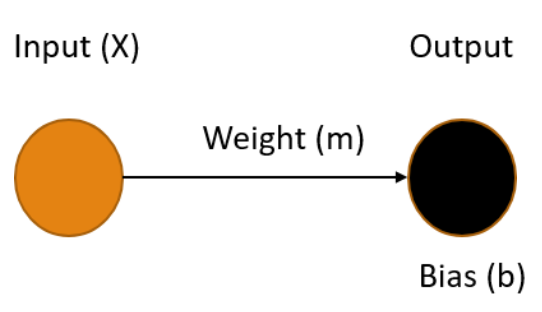
Ours is the simplest possible neural network, one input connected to one output, where our X value (time) is the input and the output Y is our prediction of the distance the train has traveled in that time. To make the best prediction we need to determine the values for the weight of the edge m and the bias of the output node b that produce the output that minimizes the errors in the model.
The process of finding the weights and biases values for a neural network that minimize the error is know as Training the model. Once these values are determined, we use the fact that we multiply the weight by the input (m * X) and add in the bias. This gives us an equation in the form:
Y = mX + b
You may recognize this as the slope-intercept form of the equation for a line, where the slope m represents the speed of the train, and the bias b represents the starting distance from the origin. Once our training process gives us values for m and b, we can easily plug-in any value for X and get a prediction for the location of our train.
Training a Model
Training an AI model is simply finding the set of parameters that minimize the difference between the predicted output and the actual output. This is key to understanding AI - it's all about minimizing the error. Error minimization is the exact same goal as we have when performing a linear regression, which makes sense since these regressions are predictive models on their own, they just aren't generally depicted as neural networks.
There are many ways to perform the error-minimization process. Many more complicated models are trained using an iterative optimization routine called Gradient Descent. Extremely simple models like this one often use a less complicated process such as Ordinary Least Squares. The goals are the same however, values for weights and biases in the model are found that minimize the error in the output, resulting in a model can make the desired predictions based on known inputs.
Regardless of the method used, the realization that training the simplest neural network results in a model of a line provided the "aha experience" I needed as the foundation for my understanding of Machine Learning models. I hope, by publishing this article, that others may also benefit from this recognition.
Like a River
Posted by bsstahl on 2023-02-06 and Filed Under: development
We all understand to some degree, that the metaphor comparing the design and construction of software to that of a building is flawed at best. That isn't to say it's useless of course, but it seems to fail in at least one critical way; it doesn't take into account that creating software should be solving a business problem that has never been solved before. Sure, there are patterns and tools that can help us with technical problems similar to those that have been solved in the past, but we should not be solving the same business problem over and over again. If we are, we are doing something very wrong. Since our software cannot simply follow long-established plans and procedures, and can evolve very rapidly, even during construction, the over-simplification of our processes by excluding the innovation and problem-solving aspects of our craft, feels rather dangerous.
Like Constructing a Building
It seems to me that by making the comparison to building construction, we are over-emphasizing the scientific aspects of software engineering, and under-emphasizing the artistic ones. That is, we don't put nearly enough value on innovation such as designing abstractions for testability and extensibility. We also don't emphasize enough the need to understand the distinct challenges of our particular problem domain, and how the solution to a similar problem in a different domain may focus on the wrong features of the problem. As an example, let's take a workforce scheduling tool. The process of scheduling baristas at a neighborhood coffee shop is fundamentally similar to one scheduling pilots to fly for a small commercial airline. However, I probably don't have to work too hard to convince you that the two problems have very different characteristics when it comes to determining the best solutions. In this case, the distinctions are fairly obvious, but in many cases they are not.
Where the architecture metaphor makes the most sense to me is in the user-facing aspects of both constructions. The physical aesthetics, as well as the experience humans have in their interactions with the features of the design are critical in both scenarios, and in both cases will cause real problems if ignored or added as an afterthought. Perhaps this is why the architecture metaphor has become so prevalent in that it is easy to see the similarities between the aesthetics and user-experience of buildings and software, even for a non-technical audience. However, most software built today has a much cleaner separation of concerns than software built when this metaphor was becoming popular in the 1960s and 70s, rendering it mostly obsolete for the vast majority of our systems and sub-systems.
When we consider more technical challenges such as design for reliability and resiliency, the construction metaphor fails almost completely. Reliability is far more important in the creation of buildings than it is in most software projects, and often very different. While it is never ok for the structure of a building to fail, it can be perfectly fine, and even expected, for most aspects of a software system to fail occasionally, as long as those failures are well-handled. Designing these mechanisms is a much more flexible and creative process in building software, and requires a large degree of innovation to solve these problems in ways that work for each different problem domain. Even though the two problems can share the same name in software and building construction, and have some similar characteristics, they are ultimately very different problems and should be seen as such. The key metaphors we use to describe our tasks should reflect these differences.
Like a River
For more than a decade now, I've been fascinated by Grady Booch's suggestion that a more apt metaphor for the structure and evolution of the software within an enterprise is that of a river and its surrounding ecosystem G. Booch, "Like a River" in IEEE Software, vol. 26, no. 03, pp. 10-11, 2009. In this abstraction, bank-to-bank slices represent the current state of our systems, while upstream-downstream sections represent changes over time. The width and depth of the river represent the breadth and depth of the structures involved, while the speed of the water, and the differences in speed between the surface (UI) and depths (back-end) represent the speed of changes within those sub-systems.
The life cycle of a software-intensive system is like a river, and we, as developers, are but captains of the boats that ply its waters and dredge its channels. - Grady Booch
I will not go into more detail on Booch's analogy, since it will be far better to read it for yourself, or hear it in his own voice. I will however point out that, in his model, Software Engineers are "…captains of the boats that ply the waters and dredge the channels". It is in this context, that I find the river metaphor most satisfying.
As engineers, we:
- Navigate and direct the flow of software development, just as captains steer their boats ina particular direction.
- Make decisions and take action to keep the development process moving forward, similar to how captains navigate their boats through obstacles and challenges.
- Maintain a highly-functional anomaly detection and early-warning system to alert us of upcoming obstacles such as attacks and system outages, similar to the way captains use sonar to detect underwater obstacles and inspections by their crew, to give them useful warnings.
- Use ingenuity and skill, while falling back on first-principles, to know when to add abstractions or try something new, in the same way that captains follow the rules of seamanship, but know when to take evasive or unusual action to protect their charge.
- Maintain a good understanding of the individual components of the software, as well as the broader architecture and how each component fits within the system, just as captains need to know both the river and its channels, and the details of the boat on which they travel.
- Are responsible for ensuring the software is delivered on time and within budget, similar to how captains ensure their boats reach their destination on schedule.
- May be acting on but one small section at a time of the broader ecosystem. That is, an engineer may be working on a single feature, and make decisions on how that element is implemented, while other engineers act similarly on other features. This is akin to the way many captains may navigate the same waters simultaneously on different ships, and must make decisions that take into account the presence, activities and needs of the others.
This metaphor, in my opinion, does a much better job of identifying the critical nature of the software developer in the design of our software than then that of the creation of a building structure. It states that our developers are not merely building walls, but they are piloting ships, often through difficult waters that have never previously been charted. These are not laborers, but knowledge-workers whose skills and expertise need to be valued and depended on.
Unfortunately this metaphor, like all others, is imperfect. There are a number of elements of software engineering where no reasonable analog exists into the world of a riverboat captain. One example is the practice of pair or mob programming. I don't recall ever hearing of any instances where a pair or group of ships captains worked collaboratively, and on equal footing, to operate a single ship. Likewise, the converse is also true. I know of no circumstances in software engineering where split-second decisions can have life-or-death consequences. That said, I think the captain metaphor does a far better job of describing the skill and ingenuity required to be a software engineer than that of building construction.
To be very clear, I am not saying that the role of a construction architect, or even construction worker, doesn't require skill and ingenuity, quite the contrary. I am suggesting that the types of skills and the manner of ingenuity required to construct a building, doesn't translate well in metaphor to that required of a software engineer, especially to those who are likely to be unskilled in both areas. It is often these very people, our management and leadership, whom these metaphors are intended to inform. Thus, the construction metaphor represents the job of a software developer ineffectively.
Conclusion
The comparisons of creating software to creating an edifice is not going away any time soon. Regardless of its efficacy, this model has come to be part of our corporate lexicon and will likely remain so for the foreseeable future. Even the title of "Software Architect" is extremely prevalent in our culture, a title which I have held, and a role that I have enjoyed for many years now. That said, it could only benefit our craft to make more clear the ways in which that metaphor fails. This clarity would benefit not just the non-technical among us who have little basis to judge our actions aside from these metaphors, but also us as engineers. It is far too easy for anyone to start to view developers as mere bricklayers, rather than the ships captains we are. This is especially true when generations of engineers have been brought up on and trained on the architecture metaphor. If they think of themselves as just workers of limited, albeit currently valuable skill, it will make it much harder for them to challenge those things in our culture that need to be challenged, and to prevent the use of our technologies for nefarious purposes.
Microservices - Not Just About Scalability
Posted by bsstahl on 2023-01-30 and Filed Under: development
Scalability is an important feature of microservices and event-driven architectures, however it is only one of the many benefits these types of architectures provide. Event-driven designs create systems with high availability and fault tolerance, as well as improvements for the development teams such as flexibility in technology choices and the ability to subdivide tasks better. These features can help make systems more robust and reliable, and have a great impact on development team satisfaction. It is important to consider these types of architectures not just for systems that need to scale to a high degree, but for any system where reliability or complexity are a concern.
The reliability of microservices come from the fact that they break-down monolithic applications into smaller, independently deployable services. When implemented properly this approach allows for the isolation of failures, where the impact of a failure in one service can be limited to that service and its consumers, rather than cascading throughout the entire system. Additionally, microservice architectures enable much easier rollbacks, where if a new service version has a bug, it can be rolled back to a previous version without affecting other services. Event-driven approaches also decouple services by communicating through events rather than direct calls, making it easier to change or replace them without affecting other services. Perhaps most importantly, microservice architectures help reliability by avoiding dual-writes. Ensuring that our services make at most one state change per execution context allows us to avoid the very painful inconsistencies that can occur when data is written to multiple locations simultaneously and these updates are only partially successful.
When asynchronous eventing is used rather than request-response messages, these systems are further decoupled in time, improving fault-tolerance and allowing the systems to self-heal from failures in downstream dependencies. Microservices also enable fault-tolerance in our services by making it possible for some of our services to be idempotent or even fully stateless. Idempotent services can be called repeatedly without additional side-effects, making it easy to recover from failures that occur during our processes.
Finally, microservices improve the development and support process by enabling modularity and allowing each team to use the tools and technologies they prefer. Teams can work on smaller, independent parts of the system, reducing coordination overhead and enabling faster time-to-market for new features and improvements. Each service can be deployed and managed separately, making it easier to manage resource usage and address problems as they arise. These architectures provide greater flexibility and agility, allowing teams to focus on delivering value to the business without being bogged down by the constraints of a monolithic architecture.
While it is true that most systems won't ever need to scale to the point that they require a microservices architecture, many of these same systems do need the reliability and self-healing capabilities modern architectures provide. Additionally, everyone wants to work on a development team that is efficient, accomplishes their goals, and doesn't constantly force them to wake up in the middle of the night to handle support issues.
If you have avoided using event-driven microservices because scalability isn't one of the key features of your application, I encourage you to explore the many other benefits of these architectures.
Critical Questions to Ask Your Team About Microservices
Posted by bsstahl on 2023-01-23 and Filed Under: development
Over the last 6 weeks we have discussed the creation, maintenance and operations of microservices and event-driven systems. We explored different conversations that development teams should have prior to working with these types of architectures. Asking the questions we outlined, and answering as many of them as are appropriate, will help teams determine which architectural patterns are best for them, and assist in building their systems and processes in a reliable and supportable way. These conversations are known as "The Critical C's of Microservices", and each is detailed individually in its own article.
The "Critical C's" are: Context, Consistency, Contract, Chaos, Competencies and Coalescence. For easy reference, I have aggregated all of the key elements of each conversation in this article. For details about why each is important, please consult the article specific to that topic.
There is also a Critical C's of Microservices website that includes the same information as in these articles. This site will be kept up-to-date as the guidance evolves.
Questions about Context
Development teams should have conversations around Context that are primarily focused around the tools and techniques that they intend to use to avoid the Dual-Writes Anti-Pattern. These conversations should include answering questions like:
- What database technologies will we use and how can we leverage these tools to create downstream events based on changes to the database state?
- Which of our services are currently idempotent and which ones could reasonably made so? How can we leverage our idempotent services to improve system reliability?
- Do we have any services right now that contain business processes implemented in a less-reliable way? If so, pulling this functionality out into their own microservices might be a good starting point for decomposition.
- What processes will we as a development team implement to track and manage the technical debt of having business processes implemented in a less-reliable way?
- What processes will we implement to be sure that any future less-reliable implementations of business functionality are made with consideration and understanding of the debt being created and a plan to pay it off.
- What processes will we implement to be sure that any existing or future less-reliable implementations of business functionality are documented, understood by, and prioritized by the business process owners.
Questions about Consistency
Development teams should have conversations around Consistency that are primarily focused around making certain that the system is assumed to be eventually consistency throughout. These conversations should include answering questions like:
- What patterns and tools will we use to create systems that support reliable, eventually consistent operations?
- How will we identify existing areas where higher-levels of consistency have been wedged-in and should be removed?
- How will we prevent future demands for higher-levels of consistency, either explicit or assumed, to creep in to our systems?
- How will we identify when there are unusual or unacceptable delays in the system reaching a consistent state?
- How will we communicate the status of the system and any delays in reaching a consistent state to the relevant stakeholders?
Questions about Contract
Development teams should have conversations around Contract that are primarily focused around creating processes that define any integration contracts for both upstream and downstream services, and serve to defend their internal data representations against any external consumers. These conversations should include answering questions like:
- How will we isolate our internal data representations from those of our downstream consumers?
- What types of compatibility guarantees are our tools and practices capable of providing?
- What procedures should we have in place to monitor incoming and outgoing contracts for compatibility?
- What should our procedures look like for making a change to a stream that has downstream consumers?
- How can we leverage upstream messaging contracts to further reduce the coupling of our systems to our upstream dependencies?
Questions about Chaos
Development teams should have conversations around Chaos that are primarily focused around procedures for identifying and remediating possible failure points in the application. These conversations should include answering questions like:
- How will we evaluate potential sources of failures in our systems before they are built?
- How will we handle the inability to reach a dependency such as a database?
- How will we handle duplicate messages sent from our upstream data sources?
- How will we handle messages sent out-of-order from our upstream data sources?
- How will we expose possible sources of failures during any pre-deployment testing?
- How will we expose possible sources of failures in the production environment before they occur for users?
- How will we identify errors that occur for users within production?
- How will we prioritize changes to the system based on the results of these experiments?
Questions about Competencies
Development teams should have conversations around Competencies that are primarily focused around what systems, sub-systems, and components should be built, which should be installed off-the-shelf, and what libraries or infrastructure capabilities should be utilized. These conversations should include answering questions like:
- What are our core competencies?
- How do we identify "build vs. buy" opportunities?
- How do we make "build vs. buy" decisions on needed systems?
- How do we identify cross-cutting concerns and infrastructure capabilites that can be leveraged?
- How do we determine which libraries or infrastructure components will be utilized?
- How do we manage the versioning of utilized components, especially in regard to security updates?
- How do we document our decisions for later review?
Questions about Coalescence
Development teams should have conversations around Coalescence that are primarily focused around brining critical information about the operation of our systems together for easy access. These conversations should include answering questions like:
- What is our mechanism for deployment and system verification?
- How will we identify, as quickly as possible, when a deployment has had a negative impact on our system?
- Are there tests that can validate the operation of the system end-to-end?
- How will we surface the status of any deployment and system verification tests?
- What is our mechanism for logging/traceability within our system?
- How will we coalesce our logs from the various services within the system?
- How will we know if there are anomalies in our logs?
- Are there additional identifiers we need to add to allow traceability?
- Are there log queries that, if enabled, might provide additional support during an outage?
- Are there ways to increase the level of logging when needed to provide additional information and can this be done wholistically on the system?
- How will we expose SLIs and other metrics so they are available when needed?
- How will we know when there are anomalies in our metrics?
- What are the metrics that would be needed in an outage and how will we surface those for easy access?
- Are there additional metrics that, if enabled, might provide additional support during an outage?
- Are there ways to perform ad-hoc queries against SLIs and metrics to provide additional insight in an outage?
- How will we identify the status of dependencies so we can understand when our systems are reacting to downstream anomalies?
- How will we surface dependency status for easy access during an outage?
- Are there metrics we can surface for our dependencies that might help during an outage?
The Critical C's of Microservices - Coalescence
Posted by bsstahl on 2023-01-16 and Filed Under: development
"The Critical C's of Microservices" are a series of conversations that development teams should have around building event-driven or other microservice based architectures. These topics will help teams determine which architectural patterns are best for them, and assist in building their systems and processes in a reliable and supportable way.
The "Critical C's" are: Context, Consistency, Contract, Chaos, Competencies and Coalescence. Each of these topics has been covered in detail in this series of 6 articles. The first article of the 6 was on the subject of Context. This is the final article in the series, and covers the topic of Coalescence.
Coalescence
The use of Microservices reduces the complexity of our services in many ways, however it also adds complexity when it comes to deployment and operations. More services mean more deployments, even as each of those deployments is smaller and more isolated. Additionally, they can be harder on operations and support teams since there can be many more places to go when you need to find information. Ideally, we would coalesce all of the necessary information to operate and troubleshoot our systems in a single pane-of-glass so that our operations and support engineers don't have to search for information in a crisis.
Deployment and system verification testing can help us identify when there are problems at any point in our system and give us insight into what the problems might be and what caused them. Tests run immediately after any deployment can help identify when a particular deployment has caused a problem so it can be addressed quickly. Likewise, ongoing system verification tests can give early indications of problems irrespective of the cause. Getting information about the results of these tests quickly and easily into the hands of the engineers that can act on them can reduce costs and prevent outages.
Logging and traceability is generally considered a solved problem, so long as it is used effectively. We need to setup our systems to make the best use of our distributed logging systems. This often means adding a correlation identifier alongside various request and causation ids to make it easy to trace requests through the system. We also need to be able to monitor and surface our logs so that unusual activity can be recognized and acted on as quickly as possible.
Service Level Indicators (SLIs) and other metrics can provide key insights into the operations of our systems, even if no unusual activity is seen within our logs. Knowing what operational metrics suggest there might be problems within our systems, and monitoring changes to those metrics for both our services and our dependencies can help identify, troubleshoot and even prevent outages. Surfacing those metrics for easy access can give our support and operations engineers the tools they need to do their jobs effectively.
Goals of the Conversation
Development teams should have conversations around Coalescence that are primarily focused around brining critical information about the operation of our systems together for easy access. These conversations should include answering questions like:
- What is our mechanism for deployment and system verification?
- How will we identify, as quickly as possible, when a deployment has had a negative impact on our system?
- Are there tests that can validate the operation of the system end-to-end?
- How will we surface the status of any deployment and system verification tests?
- What is our mechanism for logging/traceability within our system?
- How will we coalesce our logs from the various services within the system?
- How will we know if there are anomalies in our logs?
- Are there additional identifiers we need to add to allow traceability?
- Are there log queries that, if enabled, might provide additional support during an outage?
- Are there ways to increase the level of logging when needed to provide additional information and can this be done wholistically on the system?
- How will we expose SLIs and other metrics so they are available when needed?
- How will we know when there are anomalies in our metrics?
- What are the metrics that would be needed in an outage and how will we surface those for easy access?
- Are there additional metrics that, if enabled, might provide additional support during an outage?
- Are there ways to perform ad-hoc queries against SLIs and metrics to provide additional insight in an outage?
- How will we identify the status of dependencies so we can understand when our systems are reacting to downstream anomalies?
- How will we surface dependency status for easy access during an outage?
- Are there metrics we can surface for our dependencies that might help during an outage?
The Critical C's of Microservices - Competencies
Posted by bsstahl on 2023-01-09 and Filed Under: development
"The Critical C's of Microservices" are a series of conversations that development teams should have around building event-driven or other microservice based architectures. These topics will help teams determine which architectural patterns are best for them, and assist in building their systems and processes in a reliable and supportable way.
The "Critical C's" are: Context, Consistency, Contract, Chaos, Competencies and Coalescence. Each of these topics will be covered in detail in this series of articles. The first article of the 6 was on the subject of Context. This is article 5 of the series, and covers the topic of Competencies.
Competencies
It is our responsibility as engineers to spend our limited resources on those things that give the companies we are building for a competitive advantage in the market. This means limiting our software builds to areas where we can differentiate that company from others. Not every situation requires us to build a custom solution, and even when we do, there is usually no need for us to build every component of that system.
If the problem we are solving is a common one that many companies deal with, and our solution does not give us a competitive advantage over those other companies, we are probably better off using an off-the-shelf product, whether that is a commercial (COTS) product, or a Free or Open-Source one (FOSS). Software we build should be unique to the company it is being built for, and provide that company with a competitive advantage. There is no need for us to build another Customer Relationship Manager (CRM) or Accounting system since these systems implement solutions to solved problemns that are generally solved in the same way by everyone. We should only build custom solutions if we are doing something that has never been done before or we need to do things in a way that is different from everyone else and can't be done using off-the-shelf systems.
We should also only be building custom software when the problem being solved is part of our company's core competencies. If we are doing this work for a company that builds widgets, it is unlikely, though not impossible, that building a custom solution for getting parts needed to build the widgets will provide that company with a competitive advantage. We are probably better off if we focus our efforts on software to help make the widgets in ways that are better, faster or cheaper.
If our "build vs. buy" decision is to build a custom solution, there are likely to be opportunities within those systems to use pre-existing capabilities rather than writing everything from scratch. For example, many cross-cutting concerns within our applications have libraries that support them very effectively. We should not be coding our own implementations for things like logging, configuration and security. Likewise, there are many capabilities that already exist in our infrastructure that we should take advantage of. Encryption, which is often a capability of the operating system, is one that springs to mind. We should certainly never "roll-our-own" for more complex infrastructure features like Replication or Change Data Capture, but might even want to consider avoiding rebuilding infrastructure capabilities that we more commonly build. An example of this might be if we would typically build a Web API for our systems, we might consider exposing the API's of our backing infrastructure components instead, properly isolated and secured of course, perhaps via an API Management component.
Goals of the Conversation
Development teams should have conversations around Competencies that are primarily focused around what systems, sub-systems, and components should be built, which should be installed off-the-shelf, and what libraries or infrastructure capabilities should be utilized. These conversations should include answering questions like:
- What are our core competencies?
- How do we identify "build vs. buy" opportunities?
- How do we make "build vs. buy" decisions on needed systems?
- How do we identify cross-cutting concerns and infrastructure capabilites that can be leveraged?
- How do we determine which libraries or infrastructure components will be utilized?
- How do we manage the versioning of utilized components, especially in regard to security updates?
- How do we document our decisions for later review?
Next Up - Coalescence
In the final article of this series we will look at Coalescence and how we should work to bring all of the data together for our operations & support engineers.
The Critical C's of Microservices - Chaos
Posted by bsstahl on 2023-01-02 and Filed Under: development
"The Critical C's of Microservices" are a series of conversations that development teams should have around building event-driven or other microservice based architectures. These topics will help teams determine which architectural patterns are best for them, and assist in building their systems and processes in a reliable and supportable way.
The "Critical C's" are: Context, Consistency, Contract, Chaos, Competencies and Coalescence. Each of these topics will be covered in detail in this series of articles. The first article of the 6 was on the subject of Context. This is article 4 of the series, and covers the topic of Chaos.
Chaos
One of the Fallacies of Distributed Computing is that the network is reliable. We should have similarly low expectations for the reliability of all of the infrastructure on which our services depend. Networks will segment, commodity servers and drives will fail, containers and operating systems will become unstable. In other words, our software will have errors during operation, no matter how resilient we attempt to make it. We need to embrace the fact that failures will occur in our software, and will do so at random times and often in unpredictable ways.
If we are to build systems that don't require our constant attention, especially during off-hours, we need to be able to identify what happens when failures occur, and design our systems in ways that will allow them to heal automatically once the problem is corrected.
To start this process, I recommend playing "what-if" games using diagrams of the system. Walk through the components of the system, and how the data flows through it, identifying each place where a failure could occur. Then, in each area where failures could happen, attempt to define the possible failure modes and explore what the impact of those failures might be. This kind of "virtual" Chaos Engineering is certainly no substitute for actual experimentation and testing, but is a good starting point for more in-depth analysis. It also can be very valuable in helping to understand the system and to produce more hardened services in the future.
Thought experiments are useful, but you cannot really know how a system will respond to different types of failures until you have those failures in production. Historically, such "tests" have occurred at random, at the whim of the infrastructure, and usually at the worst possible time. Instead of leaving these things to chance, tools like Chaos Monkey can be used to simulate failures in production, and can be configured to create these failures during times where the appropriate support engineers are available and ready to respond if necessary. This way, we can see if our systems respond as we expect, and more importantly, heal themselves as we expect.
Even if you're not ready to jump into using automated experimentation tools in production just yet, a lot can be learned from using feature-flags and changing service behaviors in a more controlled manner as a starting point. This might involve a flag that can be set to cause an API method to return an error response, either as a hard failure, or during random requests for a period of time. Perhaps a switch could be set to stop a service from picking-up asynchronous messages from a queue or topic. Of course, these flags can only be placed in code we control, so we can't test failures of dependencies like databases and other infrastructure components in this way. For that, we'll need more involved testing methods.
Regardless of how we test our systems, it is important that we do everything we can to build systems that will heal themselves without the need for us to intervene every time a failure occurs. As a result, I highly recommend using asynchronous messaging patterns whenever possible. The asynchrony of these tools allow our services to be "temporally decoupled" from their dependencies. As a result, if a container fails and is restarted by Kubernetes, any message in process is rolled-back onto the queue or topic, and the system can pick right up where it left off.
Goals of the Conversation
Development teams should have conversations around Chaos that are primarily focused around procedures for identifying and remediating possible failure points in the application. These conversations should include answering questions like:
- How will we evaluate potential sources of failures in our systems before they are built?
- How will we handle the inability to reach a dependency such as a database?
- How will we handle duplicate messages sent from our upstream data sources?
- How will we handle messages sent out-of-order from our upstream data sources?
- How will we expose possible sources of failures during any pre-deployment testing?
- How will we expose possible sources of failures in the production environment before they occur for users?
- How will we identify errors that occur for users within production?
- How will we prioritize changes to the system based on the results of these experiments?
Next Up - Competencies
In the next article of this series we will look at Competencies and how we should focus at least as much on what we build as how we build it.
The Critical C's of Microservices - Contract
Posted by bsstahl on 2022-12-26 and Filed Under: development
"The Critical C's of Microservices" are a series of conversations that development teams should have around building event-driven or other microservice based architectures. These topics will help teams determine which architectural patterns are best for them, and assist in building their systems and processes in a reliable and supportable way.
The "Critical C's" are: Context, Consistency, Contract, Chaos, Competencies and Coalescence. Each of these topics will be covered in detail in this series of articles. The first article of the 6 was on the subject of Context. This is article 3 of the series, and covers the topic of Contract.
Contract
Once a message has been defined and agreed to as an integration mechanism, all stakeholders in that integration have legitimate expectations of that message contract. Primarily, these expectations includes the agreed-to level of compatibility of future messages, and what the process will be when the contract needs to change. These guarantees will often be such that messages can add fields as needed, but cannot remove, move, or change the nature of existing fields without significant coordination with the stakeholders. This can have a severe impact on the agility of our dev teams as they try to move fast and iterate with their designs.
In order to keep implementations flexible, there should be an isolation layer between the internal representation (Domain Model) of any message, and the more public representation (Integration Model). This way, the developers can change the internal representation with only limited restrictions, so long as as the message remains transformationally compatible with the integration message, and the transformation is modified as needed so that no change is seen by the integration consumers. The two representations may take different forms, such as one in a database, the other in a Kafka topic. The important thing is that the developers can iterate quickly on the internal representation when they need to.
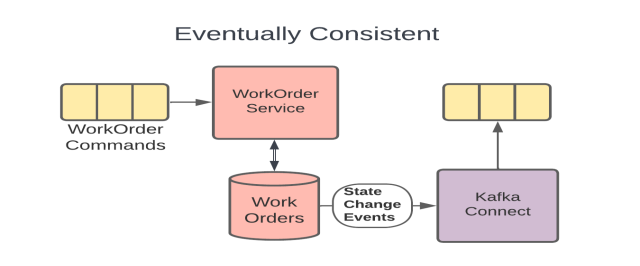
The Eventually Consistent example from the earlier Consistency topic (included above) shows such an isolation layer since the WorkOrders DB holds the internal representation of the message, the Kafka Connect connector is the abstraction that performs the transformation as needed, and the topic that the connector produces data to is the integration path. In this model, the development team can iterate on the model inside the DB without necessarily needing to make changes to the more public Kafka topic.
We need to take great care to defend these internal streams and keep them isolated. Ideally, only 1 service should ever write to our domain model, and only internal services, owned by the same small development team, should read from it. As soon as we allow other teams into our domain model, it becomes an integration model whether we want it to be or not. Even other internal services should use the public representation if it is reasonable to do so.
Similarly, our services should make proper use of upstream integration models. We need to understand what level of compatibility we can expect and how we will be notified of changes. We should use these data paths as much as possible to bring external data locally to our services, in exactly the form that our service needs it in, so that each of our services can own its own data for both reliability and efficiency. Of course, these local stores must be read-only. We need to publish change requests back to the System of Record to make any changes to data sourced by those systems.
We should also do everything we can to avoid making assumptions about data we don't own. Assuming a data type, particular provenance, or embedded-intelligence of a particular upstream data field will often cause problems in the future because we have created unnecessary coupling. As an example, it is good practice to treat all foreign identifiers as strings, even if they look like integers, and to never make assumptions along the lines of "...those identifiers will always be increasing in value". While these may be safe assumptions for a while, they should be avoided if they reasonably can be to prevent future problems.
Goals of the Conversation
Development teams should have conversations around Contract that are primarily focused around creating processes that define any integration contracts for both upstream and downstream services, and serve to defend their internal data representations against any external consumers. These conversations should include answering questions like:
- How will we isolate our internal data representations from those of our downstream consumers?
- What types of compatibility guarantees are our tools and practices capable of providing?
- What procedures should we have in place to monitor incoming and outgoing contracts for compatibility?
- What should our procedures look like for making a change to a stream that has downstream consumers?
- How can we leverage upstream messaging contracts to further reduce the coupling of our systems to our upstream dependencies?
Next Up - Chaos
In the next article of this series we will look at Chaos and how we can use both thought and physical experiments to help improve our system's reliability.
 Barry S. Stahl (he/him/his) - Barry is a .NET Software Engineer who has been creating business solutions for enterprise customers for more than 35 years. Barry is also an Election Integrity Activist, baseball and hockey fan, husband of one genius and father of another, and a 40 year resident of Phoenix Arizona USA. When Barry is not traveling around the world to speak at Conferences, Code Camps and User Groups or to participate in GiveCamp events, he spends his days as a Solution Architect for Carvana in Tempe AZ and his nights thinking about the next AZGiveCamp event where software creators come together to build websites and apps for some great non-profit organizations.